

Showing posts with label ubuntu 20.04 focal fossa. Show all posts

This is a collection of hard disk partitioning and maintenancing tutorials published by Ubuntu Buzz in several years. With these tutorials, you can learn how to create, format, reformat, rename, delete, resize, enlarge, shrink filesystems and partitions to digital storages including hard disk drives (HDDs), SSDs, flash drives, both internal or external. They are mostly graphical user interface (GUI) based, can be done easily in LiveCD mode, and are reasonably universal for everyone to practice in any operating system including Windows and macOS other than GNU/Linux. We discussed here tools we actually use mainly GParted, GNOME Disk Utility, KDE Partition Manager as well as other important utility like Testdisk and Unetbootin with one booting guide for ThinkPad our favorite laptop brand. We support both Legacy BIOS as well as UEFI booting methods and both MBR and GPT partitioning schemes. All in all, here's the compilation for you.


Subscribe to UbuntuBuzz Telegram Channel to get article updates.
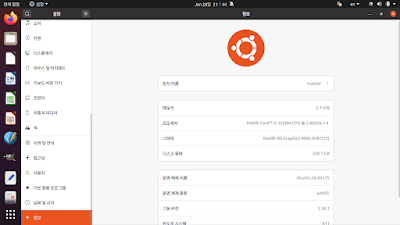
This tutorial will help you switch Ubuntu operating system language into Korean (한국어, hangugeo). This will change English words into Korean in the menu, calendar, tray, application names, windows, and everything else. Good luck!

Subscribe to UbuntuBuzz Telegram Channel to get article updates.

Backports repository is useful for Ubuntu users who want newer versions of certain software packages (including development tools, hardware drivers) only available in the newer OS release. For example, in Focal, we only get LibreOffice 6.4 at best, while to get LibreOffice 7 we usually should upgrade the OS version instead the software version. How to upgrade the software only? Ubuntu gives us Backports repository in order to solve this issue. This tutorial will explain in simple manners with examples to do that. 


Subscribe to UbuntuBuzz Telegram Channel to get article updates.

Here's my review of Linux Mint 20, the user friendly computer operating system from Ireland, Europe, released June this year, named Ulyana, and is also a Long Term Support version. This major release happened two months after its basis, Ubuntu Focal Fossa, and two years after the previous Linux Mint 19 Tara LTS, released. It brings a new star feature, called Warpinator, which enables us to share files between laptops easily via wifi hotspot, along with other features. It comes with great news too as now it shipped as their third generation branded computer MintBox3. I do this review using my Lenovo ThinkPad laptop with my favorite edition selection Cinnamon. Finally, now let's enjoy Ulyana goes on!

(Ulyana GNU/Linux: cool and elegant on my ThinkPad laptop)
Subscribe to UbuntuBuzz Telegram Channel to get article updates.

As I posted last year, KDE 4 is my favorite. Surprisingly, Kubuntu 20.04 brings the legacy Oxygen theme built-in. Thanks to Gemlog on social media, I discovered it. Now I bring you how I do it.


Subscribe to UbuntuBuzz Telegram Channel to get article updates

This is the traditional suggestions list for everyone having new computer with Kubuntu operating system. It is intended for version 20.04 LTS Focal Fossa right now. This includes tips and tricks about adjusting your battery management, desktop conveniences, apps recommendation, and more. I wish you enjoy friendly computing with Kubuntu by reading this. Let's go!
Subscribe to UbuntuBuzz Telegram Channel to get article updates.

This tutorial explains procedures to install Kubuntu operating system into computer or laptop. It is version 20.04 also known as Focal Fossa with Long Term Support for next five years. This tutorial also includes the procedures if you want to install Kubuntu in dualboot with other OS, or if your computer is UEFI, or even if you prefer to have it on external storage media such as flash drive. Enjoy Kubuntu!
 
Subscribe to UbuntuBuzz Telegram Channel to get article updates.

This is for you who want to have Telegram application on Ubuntu Focal Fossa and latest GNU/Linux Mint 20 Ulyana and Fedora 32. You can also practice this on other great OSes released just recently most notably MX Patito Feo and deepin 20. This means you can enjoy the fastest instant messenger on latest free software operating systems released this year for your computer and laptop. Enjoy Telegram!

(Telegram Desktop running nicely on a deepin computer)
Subscribe to UbuntuBuzz Telegram Channel to get article updates.

Finally deepin 20 released in September this year following Ubuntu 20.04 LTS. Both are Free Libre Open Source Software computer operating systems. However, as we know Ubuntu brings many nice features, we celebrate with deepin the brand new look and move towards freedom. This article summarizes both beautiful OSes for everyone. Enjoy!

Subscribe to UbuntuBuzz Telegram Channel to get article updates.

This tutorial explains how I successfully upgraded my Ubuntu Desktop operating system from 18.04 LTS to 20.04 LTS. This goes through four clear & easy steps using command lines with a restart and includes preparations information. I wish you also upgraded Ubuntu successfully. Welcome to Ubuntu!

(Ubuntu upgraded from Bionic to Focal Fossa)
Subscribe to UbuntuBuzz Telegram Channel to get article updates.

Great news for computer users as along with Ubuntu, this year MX also released a new version. The interesting point is that Ubuntu and MX are currently ranked number 4th and 1st respectively and thus among the big five of Distrowatch.com. As a good news, MX still supports legacy thirty-two-bit computers with latest updates for you who cannot get that from latest Ubuntu. One more good news for us is that we can purchase computers with either of two today from vendors like Dell, Lenovo, and Star Labs. Continuing the previous short comparison reviews against Fedora and openSUSE, now this sums up Ubuntu and MX this year for you. Enjoy!


(Computer running MX displaying both Ubuntu's and MX's official homepages)
Subscribe to UbuntuBuzz Telegram Channel to get article updates.

This year 2020 is amazing as two big European computer operating systems come out. They are Ubuntu and openSUSE more precisely version Focal Fossa and Leap 15.2. They are ranked number 4th and 13th on Distrowatch.com.This article sums up these two for everyone to quickly download or purchase a computer with them. 

Subscribe to UbuntuBuzz Telegram Channel to get article updates.

This tutorial explains easy steps to create wifi hotspot on Ubuntu laptop. With this you can share an internet access with friends and your other devices. It is very simple everyone can do. You don't need to install any application nor using terminal. This is based on Focal Fossa but certainly you can practice on prior or later versions too as long as their desktop is GNOME 3 such as Bionic Beaver or Groovy Gorilla versions. Happy sharing!

Subscribe to UbuntuBuzz Telegram Channel to get article updates.

Here you find summary all our works on Ubuntu 20.04 from Download Links to Installation Guide from Reviews to Apps Recommendations plus Beginner's Guide in one place. For us facing pandemic right now, there is even Corona Kit to help remote works with only Free Software. This summary also covers six Official Flavors from Kubuntu to Ubuntu Budgie. For everyone who wants to know Focal Fossa this summary is really for you. Enjoy!

 Subscribe to UbuntuBuzz Telegram Channel to get article updates.

This last part of Ubuntu 20.04 review conveys the use for real world life purposes. If the first part talks about panorama, second talks about power, then this part speaks about life. Ubuntu Focal Fossa empowers my old laptop for everything routine smoothly including browsing folders, viewing pictures, editing documents, and playing videos without any hardware problem so I felt very satisfied. I report to everyone in computing you can happily use Ubuntu right away. Enjoy!

(My student uses 20.04 to learn Ubuntu starting from the beginning)
Subscribe to UbuntuBuzz Telegram Channel to get article updates.


Expanding my previous memory comparisons, now I present you Ubuntu Focal Fossa, Mint Ulyana, and Fedora 32 the three most famous operating systems which are always in top ten Distrowatch rank and released just recently in 2020. In the same time I compare respectively two desktop environments loved by the community namely GNOME and Cinnamon. All pictures above are in full size so simply click one to view it bigger. I hope this helps everyone choosing right distro and right desktop environment from many choices of GNU/Linux. Enjoy!


Subscribe to UbuntuBuzz Telegram Channel to get article updates directly.

Traditionally before 20.04 you looked for PPAs to install more software and get more updates on Ubuntu from outside of the official repository. Fortunately this tradition is still alive. This article once again brings you PPAs for Focal Fossa. This big list includes only Free/Libre Open Source Software from Audacious to Wine sorted alphabetically. This time it welcomes Element as new app as well. Last but not least, it includes explanation, how to install and uninstall the apps for you. Happy working!

Subscribe to UbuntuBuzz Telegram Channel to get article updates directly.

Hello computer users! This year Ubuntu operating system releases its latest version numbered 20.04 and called Focal Fossa. However, Ubuntu 20.04 comes altogether with its six official flavors or I prefer to call them a family you may have never heard before. They are all professional modern operating systems with each own specialties you can choose for your computer. Important for you to know they are known as Free and Libre and Open Source Software you can use to make you independent from Microsoft or Apple. Use them on your computer you can enter a happiest life where you don't worry about viruses anymore and make antivirus just a thing of the past. This short article introduces you to all seven Ubuntu in the year 2020. Hope you find the best one!

Subscribe to UbuntuBuzz Telegram Channel to get article updates directly.

We're happy LibreOffice 7.0 finally released early August this year. This tutorial explains things for you wanting to get it on Ubuntu 20.04 LTS Focal Fossa. This tutorial offers you standard ways (Deb) as well as alternative ways (AppImage, Flatpak, Snap) you may choose to install it. For merely testing purpose you must start with the AppImage one as it is safest to your system. Finally, congratulations to LibreOffice community and gratitude to all the developers! Happy writing!

Subscribe to UbuntuBuzz Telegram Channel to get article updates directly.


Released April, Ubuntu 20.04 LTS family including Kubuntu and others made available to all computer users worldwide. With one of these a person can make their computer working – fortunately different to Microsoft Windows they are Free/Libre Open Source Software operating system. To help people choose an Ubuntu edition, as I continuously do since 18.04 LTS two years ago, I present you here again my comparison chart 2020 edition accompanied with screenshots. As you can see here Ubuntu with GNOME requires the most memory while Lubuntu requires the least and Kubuntu's is equal Xubuntu's. I hope I help you choose the best and switch to the best one in this Focal Fossa release. Enjoy!


Subscribe to UbuntuBuzz Telegram Channel to get article updates directly.