Showing posts with label libreoffice. Show all posts

Printing documents is a primary need to many of LibreOffice users. This article discusses how to do printings from LibreOffice Writer by an example of an A5 page document. We use a Canon MP160--our old but recommended multifunction printer--, on Ubuntu 24.04 "Noble Numbat" to practice this. We hope this helps everyone who uses Ubuntu for all of their computing life especially printings. Now let's start reading and go printing!


Since last year, we have written many articles about Ubuntu 24.04 "Noble Numbat" (click to view them all). Now, we planned to make a compilation of those in a periodical way i.e. tri-monthly like this. We hope this helps you to learn using Ubuntu for your daily computing better. We will start from downloads, install guide and a few important basics as you may see below. Now, here we go. 


 (A screenshot from the Apps Installation Guide tutorial in this series)


Subscribe to UbuntuBuzz Telegram Channel to get article updates.

The forty second release of Fedora GNU/Linux is here. It's released on Wednesday, 16 April 2025 or near Ubuntu 25.04 "Plucky Puffin" release date. It is available in a lot of editions, mainly: Workstation, KDE Plasma Edition (new!), Server, IoT, Cloud and many more. We make a summary of the downloads for you below to mention only editions we believe most readers will be interested to try (and links to find the rest). Finally, congratulations to all computer users and thank you to Fedora developers. Happy downloading! 


Subscribe to UbuntuBuzz Telegram Channel to get article updates.

This article suggests you several useful things to do after we finished the installation of Kubuntu 24.04 LTS "Noble Numbat". We have collected for you recommended hardware brands and printers, software applications, games, browser addons, useful adjustments, widgets and shortcuts to add, and several more. We present this to all GNU/Linux users. Finally, we hope this helps you get better daily life with Kubuntu. Let's start reading and happy friendly computing!


Subscribe to UbuntuBuzz Telegram Channel to get article updates.

This is a listing of preinstalled applications of Ubuntu 24.04 "Noble Numbat" from A to Z with brief explanations of their purposes. With this article, you will begin to know that your Ubuntu has many default apps from Additional Drivers to Videos and you will learn in general about what you can do with them in your computing. And we also included some useful tutorials related to productivity tools like LibreOffice so you can learn more. Now let's read and we wish you the best!


Subscribe to UbuntuBuzz Telegram Channel to get article updates.

Congratulations to Canonical Ltd. and Free Software community for the release of Ubuntu 24.04! This LTS release, codenamed Noble Numbat, is out on Thursday 25 April 2024 or six months after the previous version 23.10 last year. We presented here a compilation of all download links including the Official Flavors, mirrors, and torrents. Let's celebrate together, and download and run our computer, laptop and server with Ubuntu.


Subscribe to UbuntuBuzz Telegram Channel to get article updates.

Here's our review on Kubuntu 22.04 LTS Jammy Jellyfish. In 2020 ago we called it the familiar operating system[1], now we call it keeping modern computing friendly for everyone. It is a very good, powerful desktop operating system for your mid-end PC and laptop with traditional look and feel. We also have a lot of other good news with Kubuntu today and let's go, we hope you enjoy this review once again.


Subscribe to UbuntuBuzz Telegram Channel to get article updates.

This tutorial will help you update your LibreOffice to version 7.6 on your computer powered by Trisquel 11 GNU/Linux. Because in this release Trisquel follows Ubuntu 22.04, thus LO versions are the same and the latest one is also available via a backports repository. We will update it with LO packages supported officially by The Trisquel Project.


Subscribe to UbuntuBuzz Telegram Channel to get article updates.

This tutorial will help you to get LibreOffice 7.6 on Ubuntu side-by-side with and without removing the preinstalled version. We offer several ways you may choose to do so. It can be practiced to any one of Official Flavors like Kubuntu and Lubuntu, as well as derivatives like Elementary and Zorin. Now let's practice that.


Subscribe to UbuntuBuzz Telegram Channel to get article updates.

This tutorial will help you create PDF documents on Ubuntu computer with default applications. You can do so using LibreOffice (full set consisted of Writer, Calc and Impress) and Firefox. You can do this quickly without adding any new application. Now let's try it out! 


Subscribe to UbuntuBuzz Telegram Channel to get article updates.

This tutorial will help you place copies of fonts inside document with LibreOffice. This helps digital document compatibility and interoperability with other software users especially when they use different systems. This can help solve missing fonts issue which often hinders people adopting free software and GNU/Linux. Now let's try it out!


Subscribe to UbuntuBuzz Telegram Channel to get article updates.

This tutorial will help you download and install fonts listed on the alternative fonts comparison table we published. It means you will practice visiting websites of respective fonts like Carlito's and Liberation's, downloading, extracting, viewing, installing and finally using them on your system. This is hoped to help you increase document compatibility using LibreOffice and beyond. Happy working!

Subscribe to UbuntuBuzz Telegram Channel to get article updates.

What to do after installing Mageia 9 to your computer or laptop? In case you need some advises, we have here a compilation of easy to practice tips and tricks for new Mageia users. We also linked them with some compilation of tutorials so you can be productive with LibreOffice for school and work. Congratulations for using Mageia GNU/Linux in your computing and please continue reading!


Subscribe to UbuntuBuzz Telegram Channel to get article updates.

This tutorial will help you configure font replacements on LibreOffice. This means the computer will automatically replace a font in an opened document with an existing font on your Ubuntu system, for example, replacing Times New Roman with a very identical font like FreeSerif. This is useful for teachers and students in increasing document compatibility/readability for themselves. This is applicable for all application suites including Writer, Calc and Impress. See also a companion of this article List of Alternative Fonts to know more and download them. Now let's take care of it.

Subscribe to UbuntuBuzz Telegram Channel to get article updates.

This list is a collection of third-party software repositories better known as Personal Package Archives (PPAs) for Ubuntu 22.04 LTS Jammy Jellyfish. With these, user can add versions of app and game to their Ubuntu computer system which are not available via official repositories. This article continues our tradition since version Xenial, Zesty, and Focal


Subscribe to UbuntuBuzz Telegram Channel to get article updates.

This tutorial will help you create course marketing using LibreOffice Writer. This can also be used for other marketing purposes such as culinary and medical. We have already prepared the pictures and text and you can download them then try the exercises at home step by step to achieve the final product. We make this as avid users of Ubuntu and fans of Canonical. Happy writing!


Subscribe to UbuntuBuzz Telegram Channel to get article updates.

This is a full list of all Kubuntu default applications (or list of Kubuntu components) with their explanations for first time users. Kubuntu is the official variant of Ubuntu with KDE as the technology of the desktop environment and default applications. This list is sorted alphabetically with app names taken from menu for example Ark, Dolphin and VLC Media Player. You can learn your Kubuntu computer a lot here as you see every app name, its purpose, short guide to use, and some pictures of them. This guide is based on version 22.04 also known as Jammy Jellyfish which can represents all modern Kubuntu versions. As a note, we compared many of the apps with Microsoft Windows or MacOS default apps to increase clarity. We wish you like it! 


Subscribe to UbuntuBuzz Telegram Channel to get article updates.

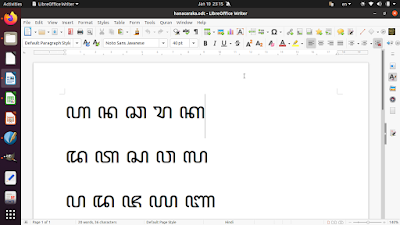
This tutorial will help you writing one of Indonesian traditional scripts, Javanese, also known as Aksara Jawa (ꦲꦏ꧀ꦱꦫꦗꦮ) or Hanacaraka (ꦲꦤꦕꦫꦏ), on Ubuntu computer. This is the real Javanese language spoken by Javanese people in Java island and not a programming language with similar name. We will show you that you can type Javanese using Firefox browser, Text Editor, LibreOffice, Gimp, Inkscape and Scribus. Now let's exercise.

(Writer showing Hanacaraka letters with Noto Sans Javanese font)

Subscribe to UbuntuBuzz Telegram Channel to get article updates.

This is a LibreOffice Calc calendar of 2023 made ready for you to download, import as template and print. We offer it as editable OpenDocument Spreadsheet (ODS) files and PDF. We use a template by Claus Kofoed Nielsen from Denmark. Feel free to download and make yourself more productive!

Subscribe to UbuntuBuzz Telegram Channel to get article updates.

This collection will help you using LibreOffice Math so you can write mathematics and scientific equations easily on Writer, Calc, and Impress. Math is the equation editor of LibreOffice that is well integrated to every window and can be called with menubar Insert > Formula. We have several tutorials with examples and pictures included you can learn below. 


Subscribe to UbuntuBuzz Telegram Channel to get article updates.