Showing posts with label collection. Show all posts

This is a collection of hard disk partitioning and maintenancing tutorials published by Ubuntu Buzz in several years. With these tutorials, you can learn how to create, format, reformat, rename, delete, resize, enlarge, shrink filesystems and partitions to digital storages including hard disk drives (HDDs), SSDs, flash drives, both internal or external. They are mostly graphical user interface (GUI) based, can be done easily in LiveCD mode, and are reasonably universal for everyone to practice in any operating system including Windows and macOS other than GNU/Linux. We discussed here tools we actually use mainly GParted, GNOME Disk Utility, KDE Partition Manager as well as other important utility like Testdisk and Unetbootin with one booting guide for ThinkPad our favorite laptop brand. We support both Legacy BIOS as well as UEFI booting methods and both MBR and GPT partitioning schemes. All in all, here's the compilation for you.


Subscribe to UbuntuBuzz Telegram Channel to get article updates.

Congratulations to Canonical Ltd. and Free Software community for the release of Ubuntu 23.10 Mantic Minotaur! It is released on Thursday 12 October 2023 or simply six months after the previous version 23.04 on April. We presented here a compilation of all download links including the Official Flavors, mirrors, and torrents. Let's download and empower our computer, laptop and server with Ubuntu.


Subscribe to UbuntuBuzz Telegram Channel to get article updates.

LMDE 6 codenamed Faye is released Wednesday, 27 September 2023. It is now based on the latest Debian 12 Bookworm. Special features of LMDE is that it supports both 32-bit and 64-bit PC architectures thus is suitable to use on older desktops and laptops from thirty years ago to the latest Intel Core i9 and AMD Ryzen generations from today. We congratulate and thank you The Linux Mint Project for this release. Finally, we compiled all download links to LMDE 6 below including their mirrors, torrents and checksums for you. Happy downloading!

Subscribe to UbuntuBuzz Telegram Channel to get article updates.

The Ubuntu Buzz has been covering several programming languages setup for years including C, C++, Java, Pascal, Rust, Qt, GTK and so on. This includes well known programmer text editors like Codeblocks, Eclipse, Geany, Qt Creator and so on.  Believe us, they are the kind of articles with so many of readers until today. This compilation collects all of them in one list below. We hope this will help you a lot especially when you start as student in Informatics major in the college. Happy hacking!


Subscribe to UbuntuBuzz Telegram Channel to get article updates.
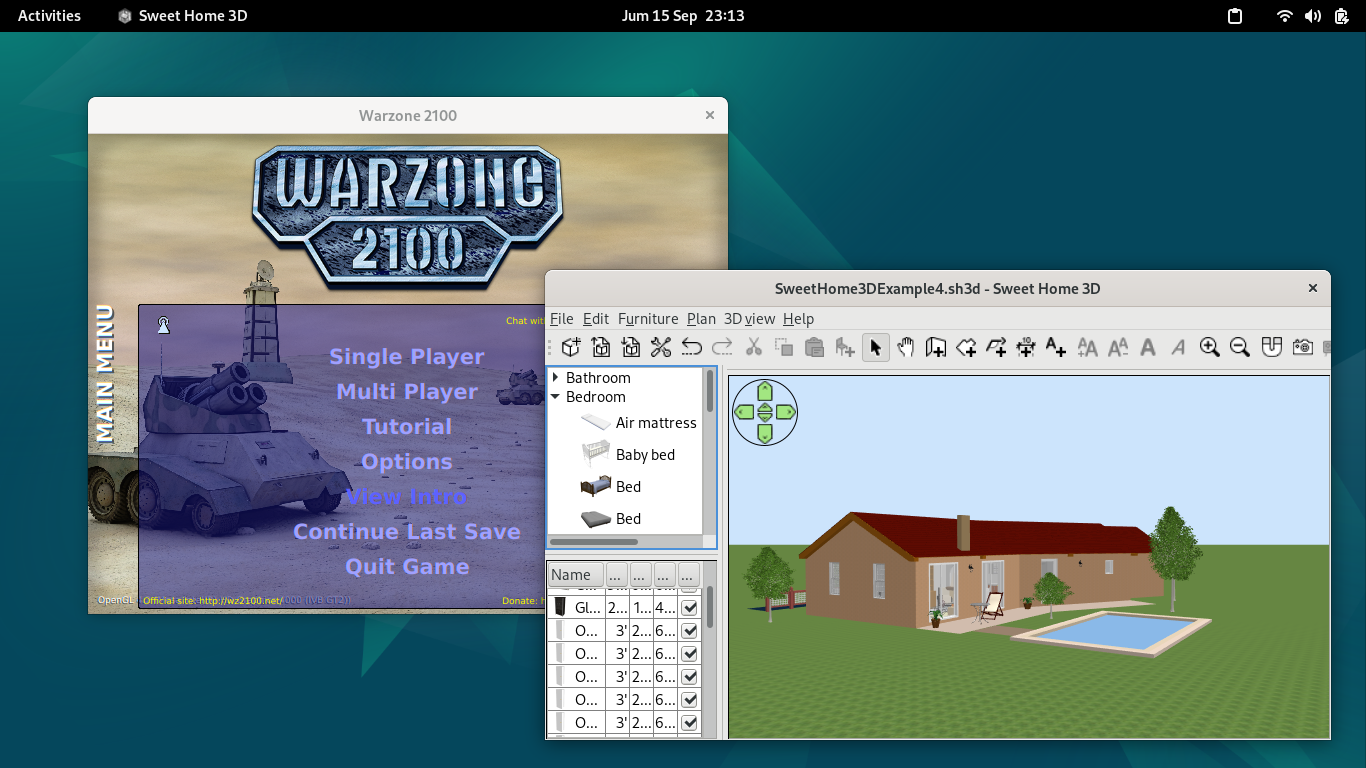
Here's our compilation of recommended applications and games for Debian 12 users. We write this especially for those who use GNOME Desktop but it works with any other desktop too. You will find below bonus recommendation links where you can download and try out ready to use sample documents or templates to be productive. We hope this will be helpful for you. So what to wait? Let's try it out.

Subscribe to UbuntuBuzz Telegram Channel to get article updates.

This collection will show you a list of software applications, games and libraries available on Ubuntu which are written in C++ programming language. Included in this list 0 A.D. strategy game, Blender 3D animation maker, and Inkscape illustrator among others. We included a quick command to install each one in case you want to try to run or play it. We hope this helps promoting Free Software as well as inviting students to learn about C++ by real-world examples and practices. Lastly, we hope you enjoy them all. Let's start reading.

Subscribe to UbuntuBuzz Telegram Channel to get article updates.

This collection will help you using LibreOffice Math so you can write mathematics and scientific equations easily on Writer, Calc, and Impress. Math is the equation editor of LibreOffice that is well integrated to every window and can be called with menubar Insert > Formula. We have several tutorials with examples and pictures included you can learn below. 


Subscribe to UbuntuBuzz Telegram Channel to get article updates.


We maintain at least 12 articles in document format conversion topic between Microsoft Office, LibreOffice, and PDF. We divide the tutorials into 4 division with 3 tutorials for each division. Every tutorial is done with LibreOffice command line and in the multiple conversion mode, in GNU/Linux. We create these series of tutorial to ease every migration from Microsoft Office to LibreOffice. We included coversion to PDF here just to ease everyone from the incompatible formats, because PDF is better than OOXML if you want to read it in every computer. We hope this series help you a lot.

Linux command prompt is the most interesting place in the system. You can do a lot with it. You can do everything you want and get the "exact" answer about what is going on. Here are some useful Linux commands you could take some advantages from.


As a self-educated person in Linux and open-source, reading e-books is one of my methods to learn Linux. There are a lot e-books on the Internet talking about Linux and other computer stuff, but getting them in one place is too difficult because they are spread at the certain place on the Internet. Today, I'd like to share my e-books collection in one place so you can browse and download it easily. My collection contains many kinds of e-books about Linux, open-source, programming, and another computer stuff.