Showing posts sorted by date for query zorin os. Sort by relevance Show all posts

Zorin OS 18 has been released last week at Tuesday, 14th October 2025. This release is special because it comes out coincidentally in the same month Canonical releases Ubuntu 25.10 "Questing Quokka" and Microsoft ends the life of Windows 10. Currently available as Pro, Core and Education choices of edition, it is the successor to OS 17 released two years ago. This GNU/Linux system is suitable for most computer users, organizations, schools and offices. Below you will find the download links. Now, let's download Zorin OS together! 


Subscribe to UbuntuBuzz Telegram Channel to get article updates.

This is once again our listing of ten useful GNOME Shell Extensions (from here will be called Extensions) for Ubuntu 24.04 LTS "Noble Numbat." We include in this listing extensions after we tested them first, among them are, Custom Command Menu and Dash To Panel, to give you a glimpse of how useful they are to our daily computing life with Ubuntu. They represent visual, productivity and repeatability improvements to your benefits. We hope this will enrich your user experience with Ubuntu a lot. Now let's start practicing!


 (Ubuntu 24.04 shows Extension Manager application with Search page opens)


Subscribe to UbuntuBuzz Telegram Channel to get article updates.

Zorin OS, the computer operating system from Ireland, released version 17 at Wednesday, 20th December, 2023. Currently available as Pro and Core editions with Lite and Education Editions waiting, it is the successor to version 16 released two years ago. This GNU/Linux system is suitable for most computer users, organizations, schools and offices. Below you will find the download links, mirrors, a torrent, checksums, and how to proceed further to the installation. Finally, once again we congratulate Zorin OS official for more than 6.2 million downloads since two years ago and it's our time to celebrate. Now let's download Zorin OS! 


Subscribe to UbuntuBuzz Telegram Channel to get article updates.

This tutorial will help you in using Snap Package Manager on your Ubuntu desktop, server and laptop. With Snap, you can install, update, remove and manage software applications as well as games available via Snapcraft.io supported by Canonical the United Kingdom company behind Ubuntu. Now we want to start with the examples included. Enjoy!


  (Nextcloud server and Xonotic shooting game running as Snaps)

Subscribe to UbuntuBuzz Telegram Channel to get article updates.
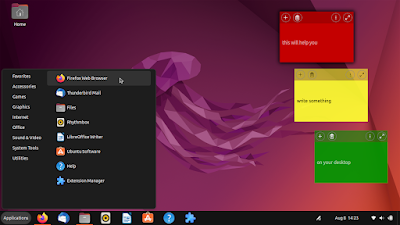
This is our recommended ten useful GNOME shell extensions for Ubuntu 22.04. It lists out just work ones of them, like, Dash to Panel, and also how to install them via the brand new application, namely, Extension Manager. Here we go.


Subscribe to UbuntuBuzz Telegram Channel to get article updates.

This tutorial will explain how you can create USB bootable installer to install Ubuntu operating system version 22.04 and later to computers. This works for all computer users who use Windows, MacOS and GNU/Linux. We offer various options here so you can pick one you like the most between using Rufus, Etcher and Ubuntu Startup Disk Creator programs. We hope this helps you a lot. Happy computing!

Subscribe to UbuntuBuzz Telegram Channel to get article updates.

Do you have an old desktop PC or laptop? We have happy news to you. You can reuse it, rather than throw it away or leaving it unused. To revive your computer, install a GNU/Linux operating system that supports old computers and is actively supported. This will give your old computer a fresh life once again, for general purpose, as well as for specific purpose like multimedia creativity and programming. You can receive latest software and security updates by using one of them on your old machine. Finally, we compile these choices in alphabetical order from antiX to Zorin OS that still support up to 15 years old computers a.k.a. 32-bit PCs with tens of thousands latest software packages. Happy computing!

 (Trisquel Mini, a good operating system for old PCs,
displayed in low resolution)

Subscribe to UbuntuBuzz Telegram Channel to get article updates.

This is a list of Free Software Desktop Systems, like KDE and GNOME the desktop environments, and like Kubuntu and Ubuntu the operating systems, and whether one is available as a complete computer to purchase. In this article, you will find useful information and further readings about the user interface choices available on GNU/Linux and BSD computing platforms. This will be used further on UbuntuBuzz.com to accompany every desktop related explanation.

[block]

Subscribe to UbuntuBuzz Telegram Channel to get article updates.

This tutorial explains how to setup Zorin OS 16 to a computer for end-users. This includes methods to install either to internal hard disk or external drive storage, even a USB Flash Drive, dualboot or singleboot, and with either UEFI-GPT or BIOS-MBR options. Please make backup  if you are dualbooting and be extra careful following every single step. Let's start!

Subscribe to UbuntuBuzz Telegram Channel to get article updates.

Flatpak is one standardized way for computer end-users to get applications on any GNU/Linux distro any version. With Flatpak there is Flathub, a central place on the internet where users can download applications in Flatpak format like LibreOffice, 0AD Strategy Game, and VLC Media Player. Now, there are several distros which included Flatpak out-of-the-box (called "Flatpak distro" here) so their users could simply click and install applications they want. This article is a simple, practical explanation of Flatpak for everyone especially computing beginners. Let's dive in!

Subscribe to UbuntuBuzz Telegram Channel to get article updates.

Zorin OS, the computer operating system from Ireland, released version 16 at Tuesday, August 17th, 2021. Currently available as Pro and Core, with Lite and Education Editions to come, it is the successor to the last year version 15.3. This GNU/Linux system is suitable for most computer users, organizations, schools and offices. Below you will find the download links, mirrors, a torrent, checksums, and how to proceed further to the installation. Finally, we congratulate Zorin OS official for nearly 3 million downloads since two years ago and it's our time to celebrate. Now let's download Zorin OS!


First time encountering Free Libre Open Source Software? First time using GNU plus Linux computers? Want to get friends and supports? want to know more about software freedom? Join our community -- the Free Software community. In this list you will see biggest discussion forums in form or web forums, mailing lists, etc. Once again, I don't make distinction whether each forum is official or not. This is a short version of my old longer list (see here, see here) so you can immediately see and join!

Subscribe to UbuntuBuzz Telegram Channel to get article updates.

Zorin OS latest version 15.3 released September 8th this year. Zorin OS is an alternative to Windows or macOS for computers that is feature rich and virus resistant. Below is all links and information list to help everyone grabs Zorin quickly and later verify their downloads. You can also make Zorin multiboot media plus more articles in the end of this list. Enjoy!


This tutorial explains how to combine pictures into one using computer program GIMP. This involves your already learned techniques namely selecting, moving, and resizing, plus one new technique called layering where every new picture added becomes a layer and layers are organized in a stack. Just like before, this tutorial is also accompanied with a one minute video showing the procedures. In case you forgot it, this is part of the GIMP for Authors the series. Enjoy editing!


(One minute video showing pictures combining in GIMP)
Subscribe to UbuntuBuzz Telegram Channel to get article updates directly.

In this tutorial you will learn to change format of photos with computer program GIMP. This means you can transform a picture from any format to JPEG, PNG, PSD, TIFF, BMP and many more. This includes making color photo into black and white too. Just like before, this tutorial also accompanied by a one minute video practicing it. Finally so you won't forget it, this tutorial is part of the GIMP for Authors the series. Enjoy editing!


Subscribe to UbuntuBuzz Telegram Channel to get article updates directly.

Thanks to my business going well with shipping many usb flash drives in Indonesia, I managed to make multiboot many distros previously I could not. Most notably are Deepin, openSUSE, Slackware which are not supported, aside from the ones automatically supported to make multiboot with notably Ubuntu family and Fedora, not to mention others. Now as I have many notes about them I want to list them out here in one place. Happy booting!

You want to make multiboot?


Learn first about using GLIM tool and then learn one among these tutorials.

Distros


I hope more GNU/Linux distros coming!


This article is licensed under CC BY-SA 3.0.


In late 2019 I successfully ship multiboot drives with Zorin OS as one among many operating systems within them. I have made the articles in making them multibootable most notably openSUSE, Deepin, and Slackware, as they were actually not supported by GLIM multiboot maker. However, I forgot that I have not made such article about Zorin as I thought I have. Now I remembered it in 2020 and this is the article you can learn once again to make it bootable like what I am currently doing with my latest Zorin articles. Enjoy!


On your computer, with GIMP you can emphasize pictures in colorful ways. You can make red rectangle or ellipse to focus your readers to a point in a picture. Of course you can use blue, green, orange, and other colors too. It is easy to do once you know how. I present you here a new video again followed by short explanations, an example, and exercises. Lastly, don't forget that this tutorial is a part of GIMP Guide for Author. Happy editing!

Here are my privacy and security tips with Zorin OS everyone can practice:


Search engine - Startpage.com - visit this privacy focused search engine and click to make it default instead of Google.

Tracker protection - uBlock Origin - install this addon to your web browser and it will block all advertisements as well as online trackers.

Browsing security - HTTPS Everywhere - install this addon too and automatically every connection to websites will be forcefully encrypted.

Password manager - KeePassXC - install this program from software center and with this you do not need to remember your gmails, facebooks, and blogs account details anymore except one password to this program only you can open.

Email secrecy - GnuPG - with this emails will be encrypted in convenient ways and only the true recipients can open them. Evolution is the client preinstalled on Zorin.

Forgetful system - Zorin LiveCD - run the OS uninstalled on any computer from within a flash drive installation media then you get an anonymous system ready for every activity and this system wipes out all stored data once computer restarted.

Get Zorin OS:

On Privacy and Security:


This article is licensed under CC BY-SA 3.0.

In this article you will learn about GIMP also known as GNU Image Manipulation Program the professional free computer image editor which is famous as Photoshop alternative. With it you can edit photos, pictures, logos, and screenshots quickly for your authoring works. For example, GIMP is good for cropping and resizing photos as well as annotating and combining pictures. I present you here an introduction, how to obtain it for your computer, running it for the first time, enjoying the application environment, and making your first work. This article is the first part and all parts will be listed in GIMP for Authors started June 2020. Enjoy!

Subscribe to UbuntuBuzz Telegram Channel to get article updates directly.