Showing posts sorted by relevance for query opensuse. Sort by date Show all posts

Here's a comparison between openSUSE and OpenMandriva (continuing our comparison involving Mageia) the two European computer operating systems from our Free Libre Open Source Software community. The most obvious similarity from both is their name, which includes the word OPEN, which comes particularly from the Open Source Movement. In this article we will see several interesting stuffs from both around their architectures, distributions, control center, etc. so we know about their YaST and OMCC, respectively. If you want to know more similarities and differences of these two OSes, this article is for you. To make it easier to read, OS below is for openSUSE while OM is for OpenMandriva. Let's go!


Subscribe to UbuntuBuzz Telegram Channel to get article updates.

openSUSE Leap 16 is finally released this week on Wednesday 1 October 2025 with the headline "Embrace the chameleon". This openSUSE Leap release is aligned with its enterprise family OS, SUSE Linux Enterprise 16, which brings a lot of improvements and security fixes. openSUSE is an European, rich and wealthy computer operating system based on Free Libre Open Source Software which is available for almost all kinds of computer including desktop, laptop, server, and Internet of Things (IoT) devices with abilities to be installed both with and without internet access. This article listed openSUSE Leap 16 download links including torrents and checksums. Happy downloading!


Download Leap 16


This is the openSUSE Leap 16 full installer for desktops, laptops and servers. Alternatively, the netinstall is the small version which requires internet access to complete the installation. As there are many choices of openSUSE Leap, if you don't know what to choose, simply download this DVD below.


DVD: [DOWNLOAD]

Alternative Netinstall: [DOWNLOAD


(A screenshot of today's openSUSE official website)
 

**** 


Download Leap for ARM Computers


This is the openSUSE Leap 16 for single board computers (SBC) and Internet of Things (IoT) such as Raspberry Pi and the others.


DVD: [DOWNLOAD]

Alternative netinstall: [DOWNLOAD]


 (Raspberry Pi 5, first introduced in 2023, a primary example of modern ARM computers. Image Source: Wikipedia. By © Anil Öztas, CC BY 4.0, Wikimedia Commons)


****


Download Leap for POWERPC Computers


This is the openSUSE Leap for PowerPC 64-bit little-endian (ppc64le). This particular family of computer architecture is more known as Apple Mac G5, Sony Playstation 3, and Microsoft Xbox in the past and IBM POWER8 to POWER 9 today. A popular product example today would be Raptor Talos  computers.


DVD: [DOWNLOAD]

Alternative netinstall: [DOWNLOAD]


 (IBM Power E870, a server computer, is a prominent example of POWER8 computers. Image source: Wikipedia. By Open Grid Scheduler / Grid Engine - Own work, CC0, Wikimedia Commons)


 (Summit, a supercomputer, was a super example of computers based on POWER9 architecture. Source: Wikipedia. By Carlos Jones/ORNL - flickr, CC BY 2.0, Wikimedia Commons)

****


Download Leap for LinuxONE / s390x Computers


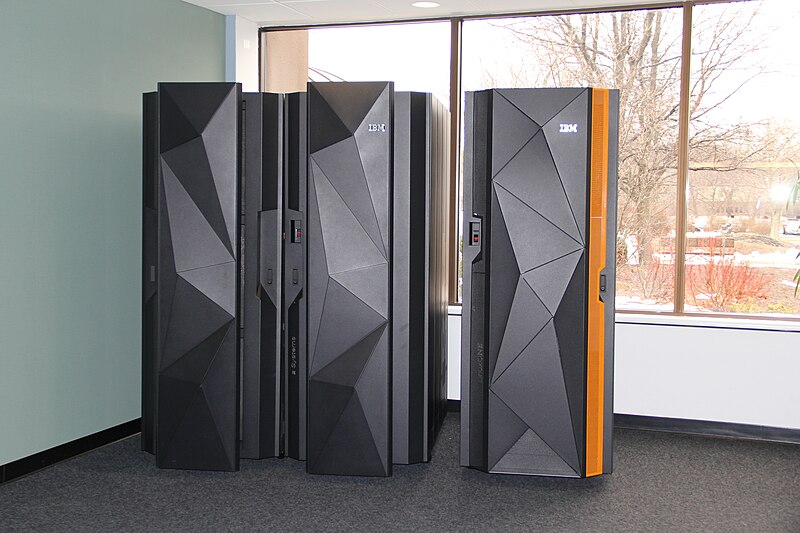
This is the openSUSE Leap for IBM LinuxONE mainframe computers or any other machines based on s390x architecture. 


DVD: [DOWNLOAD]

Alternative netinstall: [DOWNLOAD]


 (IBM LinuxOne (right, with an orange stripe) is an excellent example of computer based on s290x architecture. Image source: Wikipedia. By Agiorgio - Own work, CC BY-SA 4.0, Wikimedia Commons)


****


TORRENTS


This is the list of torrents of all openSUSE Leap above. It is a highly recommended way to download openSUSE as you will get faster download speed and at the same time decrease load burdens to community servers. You can use the applications Transmission (GNU/Linux, Windows and MacOS), KTorrent (Kubuntu), LibreTorrent (Android) to do the download. Learn to use torrents here.


Leap: [TORRENT]

Leap netinstall: [TORRENT]

Leap ARM64: [TORRENT]

Leap ARM64 netinstall: [TORRENT


**** 


Checksums 


These are the SHA256SUM list of openSUSE Leap 16. Learn about verifying your downloaded ISO here.


c90b77418c63d3b652e14cab177d51d32b8b5bb2e2f58f22e28cb0a83254a570  Leap-16.0-offline-installer-aarch64-Build171.1.install.iso

87d40549515d34cb6baaae2ea57b6547091d50626da1c0fad50fecdfe62a7c07 Leap-16.0-online-installer-x86_64.install.iso

c90b77418c63d3b652e14cab177d51d32b8b5bb2e2f58f22e28cb0a83254a570 Leap-16.0-offline-installer-aarch64.install.iso

abe795b96013bd3a885bd9d69b6451a590c36dfc133c9f3cca82ac052057f636 Leap-16.0-online-installer-aarch64.install.iso

6031e83a931b4205a9ab0c980719b0f392d28a01e72ea44e94b5c7c6a8bfe869 Leap-16.0-offline-installer-ppc64le.install.iso

6f14b9733796c8e5bf139858103c9ac4aab2c38deb1ae51e3f3a9c1290e3d131 Leap-16.0-online-installer-ppc64le.install.iso

90d86ba2a07ed77ad9fe6f77b70f87b868c4ee3f0edecf29af9f1bdeaf1a9065 Leap-16.0-offline-installer-s390x.install.iso

3b276df185eb29f642705ff846f6d15cc2128ebe5c67d5bb66f9f995b9ecfc33 Leap-16.0-online-installer-s390x.install.iso


****


Notes


openSUSE Leap 16 now requires at minimum x86-64-v2 (PC 64-bit version two) processor. Official documentation states that you should check your CPU whether it is supported or not. See References section below.  


**** 


About openSUSE


openSUSE (www.opensuse.org) is a computer operating that is free and open source from GNU/Linux family with a green lizard logo and is connected to its commercial version SUSE Linux Enterprise developed by SUSE Gmbh, a German company, in open collaboration with world wide community. It is well known for its user friendliness thanks to its setup program, called Agama (formerly YaST), that helps computer users to control all aspects of their computing, as well as its richness and wealth of advanced technology like Open Build Service and OpenQA. Its package management tool is called Zypper and its software package format is RPM. It is currently ranked 12th among the most popular GNU/Linux OSes in the world accoding to Distrowatch.com. Last but not least, openSUSE opens contribution where everyone can work together to create the best operating system ever by joining the team. See References section below.


**** 


References


Leap 16 Release Announcement

openSUSE's Official Download Page

What are amd64, i386 and ppc64el? 

Official Documentation

Checking your x86-64-v2 computer compatibility  

Donate to openSUSE  

How to contribute to and join the openSUSE Project

openSUSE's Source Code  


****


This article is licensed under CC BY-SA 3.0.


This is my experience on installing openSUSE, the green chameleon operating system, Leap Edition version 15.2 to my computer. It is a family of GNU/Linux hence a distant sibling to Ubuntu with a distinct feature called YaST, the green tapir control panel, on top of its RPM software package basis. I installed it on a virtual machine in normal method as I used on Ubuntu. However, this can be used for actual installation to the real hardware directly including in dualboot mode. Thus, I share this with you by wishing it to be useful. Let's go!
Subscribe to UbuntuBuzz Telegram Channel to get article updates.

Most operating systems can be downloaded in several ways we can choose which are usualy direct links and torrents. Unique among them, openSUSE is one that can be downloaded in another way which is called Metalink. It is a way of download, a technology, that joins direct links, mirrors and torrents in one to improve download speed and fix errors automatically. If you want to download this way, even for stuffs other than openSUSE, then this article is for you. What I can tell you as a daily torrent downloader is that Metalink is really fast. Now let's try.

Subscribe to UbuntuBuzz Telegram Channel to get article updates.

This year 2020 is amazing as two big European computer operating systems come out. They are Ubuntu and openSUSE more precisely version Focal Fossa and Leap 15.2. They are ranked number 4th and 13th on Distrowatch.com.This article sums up these two for everyone to quickly download or purchase a computer with them. 

Subscribe to UbuntuBuzz Telegram Channel to get article updates.

(GNOME:Next LiveCD running Thessaloniki lighter, faster, and more complete)

When I was writing about GNOME 3.34 yesterday, I only tested it on Fedora Rawhide, and I forgot that there is openSUSE special rolling edition. It is called openSUSE GNOME:Next and the ISO Image is available to run it as LiveCD. To date GNOME:Next includes 3.34 already and when I test it now, I'm impressed, I like GNOME 3.34 on openSUSE rather than on Fedora Rawhide! It's already fast on Fedora but it's faster and lighter on openSUSE. More than that, this openSUSE special edition includes built-in more GNOME Apps than Fedora's, like, Boxes, Buider, Fractal, Fragment, and more. It's more GNOMEish than Fedora! Now let's see it.

Subscribe to UbuntuBuzz Telegram Channel to get article updates directly.

Latest version of openSUSE, Leap 15.3, released just yesterday with the headline Bridges Path to Enterprise. This is the third update to Leap 15 which is aligned with its enterprise family OS, SUSE Linux Enterprise 15 SP3, which brings a lot of improvements and security fixes. It is an European, rich and wealthy computer operating system based on Free Libre Open Source Software which is available for almost all kinds of computer including desktop, laptop, server, and Internet of Things (IoT) with abilities to be installed both with and without internet access. From this release date to next six month, previous version 15.2 will reach end of life and should be upgraded to 15.3 to receive supports and updates. This article listed all the editions and versions including torrents you can immediately click and download. Happy downloading!


Subscribe to UbuntuBuzz Telegram Channel to get article updates.


This article introduces free software alternatives on GNU/Linux towards graphic design & 2D animation software on Windows. Yes, I write this article for those switching to GNU/Linux. You'll find here replacements for Adobe Photoshop & Illustrator, Paint Shop Pro, CorelDRAW, and even Macromedia Flash MX. I hope this list helps you finding what you need!

Subscribe to UbuntuBuzz Telegram Channel to get article updates directly.

This tutorial is inspired by errors and fixes we encountered when testing openSUSE Leap 16 yesterday. The problem is a kernel panic at boot time, so we cannot run it the same way we usually run other GNU/Linux operating systems up to today. After looking up and re-reading our old articles, we found out a solution. We hope you can run Leap 16 on a virtual machine quickly and easily with this. Now let's start reading and practicing!


 (A QEMU virtual machine showing openSUSE bootloader with Install Leap 16.0 as an option highlighted in light green)


Subscribe to UbuntuBuzz Telegram Channel to get article updates.


This article collects resources and materials (e.g. download links) from the recently held (between August and September 2016) international conferences, hackfest, and meeting in Free/Libre Open Source Software (FLOSS) community worldwide. I cover 4 conferences: GHM 2016, LibreOffice Conference 2016, QtCon 2016, and Akademy 2016; plus the next 2 conferences for October 2016 (openSUSE.Asia Summit 2016 and SFK2016) at the end. If you find any broken link or new link/information, please inform me via comment. I hope this new kind of UbuntuBuzz article would be really helpful for you.

 
(Multiboot USB website, list of supported distros, and openSUSE working after USB installation)

As you may know, my multiboot making tools were MultiSystem (since 2015), then Sundar's MultiBootUSB (2018), and recently GLIM (2019), but they all cannot work for openSUSE. Thanks to Aguslr, his program Multiboot USB (not to be confused with MultiBootUSB above) solved this problem for me! This means up to today I never managed to make openSUSE multiboot in a USB while I always managed to make other GNU/Linux distros work successfully such as Ubuntu family, Mint, Trisquel, Debian Regular, Elementary, even Fedora. In this article, I just report my success in making openSUSE Leap 15.1 multibootable USB and then installing it on a laptop. However, this article is just my report and I planned to publish tutorial on this Aguslr's Multiboot USB as soon as possible. Anyway, go ahead and happy working!

Subscribe to UbuntuBuzz Telegram Channel to get article updates directly.

 
(Bootloader of the USB stick with multiple OSes including openSUSE, the installation process, and openSUSE installed successfully thanks to Aguslr's MBUSB tool)

Since long ago I could not make openSUSE multibootable pendrive except in single boot mode. I could not use MultiSystem nor Sundar's MultiBootUSB nor even GLIM.  What's more, I could not find any easy tutorial on the net talking about making it. Fortunately, and good news for us, recently I found Aguslr's Multiboot USB (MBUSB) that is able to create it. I have tested it and as I reported few days ago I finished the installation just as perfect as other distros I had with MultiSystem. Now it's my turn to explain how I did that in 4 steps: first, create a Multiboot USB pendrive; second, copy the ISO file to USB stick; third, boot your computer to USB; and fourth, install openSUSE with it. This USB setup can accept other distros to be bootable along with openSUSE. Enjoy!

Subscribe to UbuntuBuzz Telegram Channel to get article updates directly.

We can make bootable USB drive for openSUSE in several ways. In openSUSE itself, there is a graphical program named SUSE Image Writer available for this case. In Ubuntu, there is no SUSE Image Writer available. But we can use available GNU dd command to do the same job. To locate exactly the USB device we can use lsblk and blkid tools. To show dd output in a (almost) real time way we can use pkill tool. Note: using dd will erase all the data inside the USB drive, so please make backup first. Here the procedures provided step by step.


I love KDE. I want an article introducing GNU/Linux distros dedicated to latest KDE so I write this one after my list of XFCE distros. By latest here I mean a distro which the ISO image is produced often (say, daily) to contain latest KDE release in the all three components of the Plasma, the Applications, and the Frameworks. I selected 5 distros: KDE Neon, openSUSE Krypton, Chakra, KaOS, and Fedora KDE. I hope you find your favorite one here. Read on and enjoy!

Subscribe to UbuntuBuzz Telegram Channel to get article updates directly.

(GNOME 3.32 "Taipei" running on GNU/Linux)

Following my Plasma 5.15 distros list, this is a list of GNOME 3.32 distros which are available as installation LiveCD. GNOME 3.32 has been released recently at 13 March 2019 and rapidly being made available into several GNU/Linux distros for desktop, either within the ISO or in the repository. At this moment, you can download any of Ubuntu 19.04 and Fedora Rawhide (for installable LiveCD), followed by openSUSE Tumbleweed, Debian Experimental, Manjaro GNOME, and Mageia 7 (by manually upgrading from respective repositories) in order to quickly test GNOME 3.32. However, please note that this is based on today's data and can be changed rapidly over time. I wish this list helps you. Go ahead, happy downloading, happy testing!

Subscribe to UbuntuBuzz Telegram Channel to get article updates directly.


Do you know Repology.org? It is a brilliant package search engine for all GNU/Linux distros. For us, we can find out software packages --in binary and source forms-- across various distros' repositories, even those which do not have package search facilities, and then quickly compare package version with versions available in another distros. In short, we using Ubuntu, Fedora, openSUSE and whatever distros can search for packages centrally here. For individual software developers, Repology is useful to discover which distros have not yet packaged your software, and to contact the maintainers quickly. For distro maintainers, of course it's useful to compare your repository against another distros' repositories. Repology can generate informative badge of package availability (see examples below) we can display onto any website that accept HTML code. This overview covers what Repology is with examples and how to use it for users across GNU/Linux distros in easy ways. I didn't find any other source on the net that covers it yet so I decided to write this article. I hope this helps you a lot in finding packages and researching more about GNU/Linux. Enjoy!

Subscribe to UbuntuBuzz Telegram Channel to get article updates directly.

(KDE Plasma Desktop 5.15)

We are getting excited as Plasma 5.15 has been released (since 12 February 2019) and we soon want to test it. I have tested it on Neon and it is lightweight and very impressive. This list is for you wanting to test Plasma as quick as possible by downloading GNU/Linux distros with built-in Plasma 5.15. They are Neon 5.15, Kubuntu 19.04, Chakra, KaOS, and openSUSE Tumbleweed. You can download the ISO images from links I mentioned below and quickly run a LiveCD session of them. Additionally, I also mentioned Kubuntu 18.10 and Fedora 30 on the separate section below as they don't bundle it but make it available through repositories. Anyway, go ahead and happy testing!

Subscribe to UbuntuBuzz Telegram Channel to get article updates directly.

 (GNOME User Guide viewed in Evince PDF Reader)

GNOME official provides guide book in HTML only and not in PDF. But if you search further, you can find that openSUSE provides free 200-pages GNOME guide book in PDF. It is titled GNOME User Guide - openSUSE Leap 15.0, however, seeing how general the book is, everybody could read it even though they use instead Ubuntu or another GNU/Linux distro. It covers introduction to GNOME 3 user interface, shortcut keys, file management, system settings, network & printer sharing, image editing (GIMP), CD burning (Brasero), multimedia playback (Totem), and many more. You can download, read, print out, and redistribute this book to learn by yourself and you friends! It's also a good idea to bring printed copies to school to train students and teachers. The ebook is licensed under free license (GNU FDL) and available gratis. Go download it and happy reading!

Subscribe to UbuntuBuzz Telegram Channel to get article updates directly.

Congratulations to GNOME developers! We can already try version 3.38 "Orbis" right here right now. Simply grab Fedora or openSUSE at the latest development version as you can find Orbis in them. I share with you my experience in trying out Orbis below. Along with this short review I also include the links, video, and a lot of screenshots like usual. Enjoy!

Subscribe to UbuntuBuzz Telegram Channel to get article updates.

OpenSUSE which Free/OpenSource version of Linux SUSE Enterprise, is various version of linux distro developed (supported) by novell. Yesterday (07/15/2010)
openSUSE has release openSUSE 11.3 Stable with support for 32-bit and 64-bit system. The new openSUSE 11.3 bring bright application named spideroak which can perform an online backup and file syncronizing trough internet for free, to get latest version of openSUSE can be downloaded in here.