

Showing posts with label school. Show all posts

This is the fourth compilation of our tutorials and other related articles on Ubuntu 24.04 "Noble Numbat," which have been published here at The Ubuntu Buzz since 2024. In the last compilation, we talked from the List of Ubuntu Default Apps to Thunderbird Email Client. In this episode, we compiled the articles from July and August, about Camera, for your video call experiences, the two penguin games Tux Math and Tux Typing, for your children's educational amusements, and more. We hope this compilation could be useful for you all, especially if you have just started with Ubuntu recently. Happy reading and see you next time!  


(Tux Typing is the highlight of this episode) 


Subscribe to UbuntuBuzz Telegram Channel to get article updates.

After successfully creating a sample LaTeX document in the previous tutorial, now we will try to understand the document structure in LaTeX with our Gummi Editor. We will learn, with pictures and examples, about sections (or similar to "headings" according to LibreOffice Writer) and basically how a document is organized. Now let's start our exercise!  


Subscribe to UbuntuBuzz Telegram Channel to get article updates.

In this tutorial, we want to share with you one method we use to convert OBS Studio's video recording in MKV format into MP4 with very good compression (by almost 50% reduced file size) but by keeping the quality acceptable for students to watch at home. Let's read the tips below.


Subscribe to UbuntuBuzz Telegram Channel to get article updates.
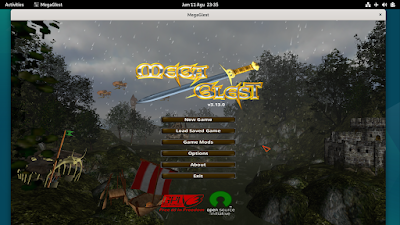
We collected ten games you can play on Debian 12 Bookworm GNU/Linux. They are all native games provided by Debian themselves and they are free software. You can immediately install and play these games by following command lines we provided under each one below. As a premiere bonus, we can also learn a lot of lessons about free software community so you can spread education about free software by playing with students at your school or friends at your office. Now choose your game and let's play!

Subscribe to UbuntuBuzz Telegram Channel to get article updates.

This tutorial will help you to install GoldenDict a desktop dictionary program on Ubuntu. This will give you English-Indonesian language translation in both ways and it also works without internet access. Other language support can be downloaded also in the end of article. We dedicate this article for education so teachers can help students in all schools to learn foreign languages. Happy learning!

 (Translation of words on a Wikipedia web page using GoldenDict (floating window) by mouse clicks)

Subscribe to UbuntuBuzz Telegram Channel to get article updates.
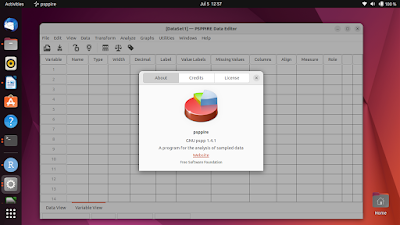
For students and academic people who use Ubuntu, especially those who meet statistics, you will likely ask for IBM SPSS alternatives that run on Ubuntu. There are several Free and Open Source software packages for statistical analysis available and they can help you switch from SPSS, Excel or SAS. Descriptive, ANOVA, Bayesian and other analysis methods are supported built-in. By this article we want to introduce LibreOffice Calc, GNU R, JASP and Jamovi.

Subscribe to UbuntuBuzz Telegram Channel to get article updates.

This tutorial will explain with examples how to draw charts with LibreOffice Calc. You will need some data prepared beforehand. We will create very basic charts in form of Bar Charts to visualize student scores of their subjects of Math, English, Science and Social. This should gives a basic understanding of making charts. Let's try it now. 

Subscribe to UbuntuBuzz Telegram Channel to get article updates.

Are you tired to do manual data entry into a spreadsheet? Would you like to make it easier with a form window? If you think this requires macros, no, it doesn’t require one. LibreOffice Calc can help you making data entry form instantly out of any table you have. Let’s create it now.
Subscribe to UbuntuBuzz Telegram Channel to get article updates.

Continuing LibreOffice Shortcuts poster, here's educational poster I made to spread LibreOffice's ODT - ODS - ODP to all people in all countries. These formats are known with the name Open Document Format and these are better than Microsoft's. The goal of this poster is to invite people to change their habits of saving as DOC - XLS - PPT formats into saving as ODT - ODS - ODP formats which are better. This poster is an English adaptation of my Indonesian version few years ago. I encourage you to place this on your schools, offices, websites, blogs, social media, and other places. You are free to adapt and share it with your own language. If you are curious, download LibreOffice application here for Windows, macOS and GNU/Linux. Okay, now let's share once again!

Original version:


 Horizontal version:


Individual versions:

Open Document Text (Writer):

Open Document Spreadsheet (Calc):

Open Document Presentation (Impress):

Open Document Drawing (Draw):

Downloads:

Poster in PNG: opendocumentformat.png (300 dpi, 400 kilobytes)
Individuals in PNG: odt-writer (100 kilobytes) | ods-calc (100 KB) | odp-impress (100 KB) | odg-draw (100 KB)
Edit: opendocumentformat.svg (300 kilobytes) 
Comments: I created this poster with Inkscape free vector drawing program just like the LibreOffice Shortcuts poster.
License: I dedicate this poster design completely in Public Domain using CC0


More posters are coming...


This article is licensed under CC BY-SA 3.0.

Ubuntu can help you to enlarge screen items and easily display cursor movements to your audience. This article is a company to Focal For Teachers and continuation to Screen Zoom on KDE. This is practicable to every GNOME operating system not only Ubuntu but also Fedora, Red Hat, Zorin and others. You can watch practical examples in this new video below and also image editing videos I published recently. For teachers and tutorial makers, this article is for you. Enjoy!

(Ubuntu for teaching in two minutes - this video displays how to zoom in and make the cursor looks clearer to audience)

This tutorial explains how to install Zotero research assistant tool completely on Ubuntu Focal Fossa. This including web browser and word processor integrations (Firefox and LibreOffice Writer). You will find a 1 minute short demo video too below. After practicing, you will have Zotero accessible on your desktop area, panel, and start menu, and finally make documents with citations and bibliography easily. Examples in using and its results also included on last sections. Enjoy!

Subscribe to UbuntuBuzz Telegram Channel to get article updates directly.

Teacher who uses computer can zoom in and increase cursor visibility on screen aside from drawing free lines and displaying keystrokes. Thanks to KDE developers, Plasma desktop has these all enjoyable teaching features built-in since a long time. You do not need to install any application, just enable them on the System Settings. Together these make a complete environment for teaching especially for screencast and live presentation. I make this short article and also a video below to explain how to do that. Finally, if you want this superb teaching ability I suggest you to use Kubuntu the friendly operating system on your computer. Happy teaching!


(Take note that Super = Meta = Win key so Super+Shift or Meta+Shift is the same as Win+Shift)
Subscribe to UbuntuBuzz Telegram Channel to get article updates directly.


BigBlueButton is a communication technology which is designed for online schooling that is accessible for everybody via web browser. With BigBlueButton, teacher can connect to students by voice/video call, live whiteboard, live presentation, collaborative text editing, and easily send them assignments in form of document files, all done without installing any application for everyone. It is a complete alternative to Zoom in the time of COVID-19 worldwide pandemic. It is free and open for everybody. This short tutorial explains the quick procedure for teacher to teach online in BigBlueButton. Happy teaching!

 Subscribe to UbuntuBuzz Telegram Channel to get article updates directly.


This is my list of GNU/Linux tools for academic, educational, and research purposes which all are free software. I tried to pick up choices as simple as possible here just to represent every basic category and further I hope you could see more alternatives if you want. I also listed several specific tools like GNU Octave and Parallel which are proven to be useful for certain researches. On the other hand, I deliberately did not list LaTeX tools here as I already chosen LibreOffice for that category. I made every proprietary software name italicized here so you can spot them on easier. Happy researching!

Subscribe to UbuntuBuzz Telegram Channel to get article updates directly.


This article provides square root equation examples for LibreOffice Math. you can copy and run all codes here in Math, and also use in Writer documents. At the end, you can download the document examples (.odf & .odt) you can study & edit later. This article is a part of LibreOffice Math the series here (Getting started, Matrix, Integral, Limit, and Trigonometry). I hope this article will be helpful for teachers in using LibreOffice at schools.

Subscribe to UbuntuBuzz Telegram Channel https://telegram.me/ubuntubuzz to get article updates directly.