Showing posts with label repository. Show all posts

This tutorial explains how you can enable your Deepin GNU/Linux version 20 upwards on your computer (codenamed Apricot) to install more software. This done by setting up the repository (central of software on the internet) so the user has the correct configuration. The result is you can later search, download, and run software you wish on your Deepin computer. You are required to be able to edit text in administrator mode to practice this. For experienced persons, you may want to go to Sources.list section right away.

Subscribe to UbuntuBuzz Telegram Channel to get article updates.

The professional free graphic design software Inkscape released version 1.0 few moments ago for all computer operating systems. Now Ubuntu users ask how to install it on Ubuntu and also on other GNU/Linux distros. Fortunately, we have a standard way to install it, and alternatively you can choose other method as you wish including portable and the 32-bit architecture versions. For all users in general I recommend more to try the AppImage version as it is the easiest one. Enjoy!

(Focal Fossa with Inkscape version 1.0)
Subscribe to UbuntuBuzz Telegram Channel to get article updates directly.

This article is not a tutorial but only a little talk about my experiment. However, I hope beginner user can benefit from this as we will see how APT command lines and how Ubuntu repositories being used in real life. We can also adapt this experiment into other distro such as Debian or PureOS. As usual, I prepare screenshots to make explanations clearer. Enjoy learning!

(Process of installing a package from eoan (newer) into disco (older) Ubuntu system)
Subscribe to UbuntuBuzz Telegram Channel to get article updates directly.


If you find your download is slow from a certain Ubuntu mirror, you can change your download source to another mirror. This change is usually necessary if your place is too far to the download source (or, if the network latency is too high). This article discusses how to do it with example from original server (in United States) to a mirror (in Indonesia). You may choose either one of two ways explained below. This is applicable for all Ubuntu versions including 18.04.

Subscribe to UbuntuBuzz Telegram Channel to get article updates directly.


This is a list of PPA repositories for Ubuntu 17.04. This list includes many PPAs for popular applications such as GIMP, Inkscape, LibreOffice, Scribus, and Android Studio. I write this list in easy format with a reference link on each PPA mentioned. You should read the link before installing the PPA, for the sake of security and stability. I hope this list helps all 17.04 users a lot!

Subscribe to UbuntuBuzz Telegram Channel to get article updates directly.


This beginner's guide Part 4 explains PPA and Third-Party Repository in Ubuntu. For your information, Ubuntu community is very huge, so there are many third-party repos available providing many software packages not available in Ubuntu official repos. There are 2 PPA examples to be used here, for GIMP and Inkscape, to show how to add the addresses and install the software packages. The aim of this Part 4 is for you to be able to add any PPA address and install software packages from PPA. This guide is a continuation of Part 3 Sources.list. I hope this part helpful for everyone.
Subscribe to UbuntuBuzz Telegram Channel https://telegram.me/ubuntubuzz to get article updates directly.


This beginner's guide Part 3 talks about Ubuntu repository address settings in sources.list. By learning this article you understand what is sources.list and how to setup it according to your needs. In Ubuntu, APT will know what repository to access and what packages to download primarily based on your sources.list settings. So sources.list is very essential for your APT system. This article explains the terms (4 "channels" and 4 "rooms"), gives many practical examples, how to edit, and adds summary and references at the end. I use Ubuntu 16.10 Yakkety Yak for example in this article. And this article is a continuation of Beginner's Guide Part 2 Basic Apt-get. I hope this part is easy for everyone to understand.
Subscribe to UbuntuBuzz Telegram Channel https://telegram.me/ubuntubuzz to get article updates directly. 


This beginner's guide for Part 2 explains Apt-get commands with examples for Ubuntu package management. This including some required explanations (about package, how apt works, and apt "database") and screenshots for 10 examples. This guide also includes add-apt-repository command, despite it's not part of APT, it's mentioned here to ensure beginner users happy with PPA and third-party repositories. This guide is a continuation of the Part 1 Dpkg Commands. I hope everyone can take advantage from this article. Enjoy.
Subscribe to UbuntuBuzz Telegram Channel https://telegram.me/ubuntubuzz to get article updates directly.


This article is for 16.04, if you are looking for 16.10, it's here.

This article provides a list of many popular applications PPAs for Ubuntu 16.04 LTS Xenial Xerus. It provides PPA addresses for LibreOffice, GIMP, Inkscape, Scribus, SimpleScreenRecorder, OpenJDK, even GNU Ring, and some more applications (I listed only free software here, please tell me if I made any mistake).
Subscribe to UbuntuBuzz Telegram Channel https://telegram.me/ubuntubuzz to get article updates directly.


This article provides a list of many popular applications PPAs for Ubuntu 16.10 Yakkety Yak. It provides PPA addresses for LibreOffice, GIMP, Inkscape, SimpleScreenRecorder, and some more applications (I listed only free software here, please tell me if I made any mistake). It's not complete for now, I will update it when it's needed.

Usually we  can add a new PPA repository by adding it into Software Sources (software-properties-gtk) either from Ubuntu Software Center or Synaptic. But actually we can add same PPA manually. This manual method will help user to easily remove unused PPA later.

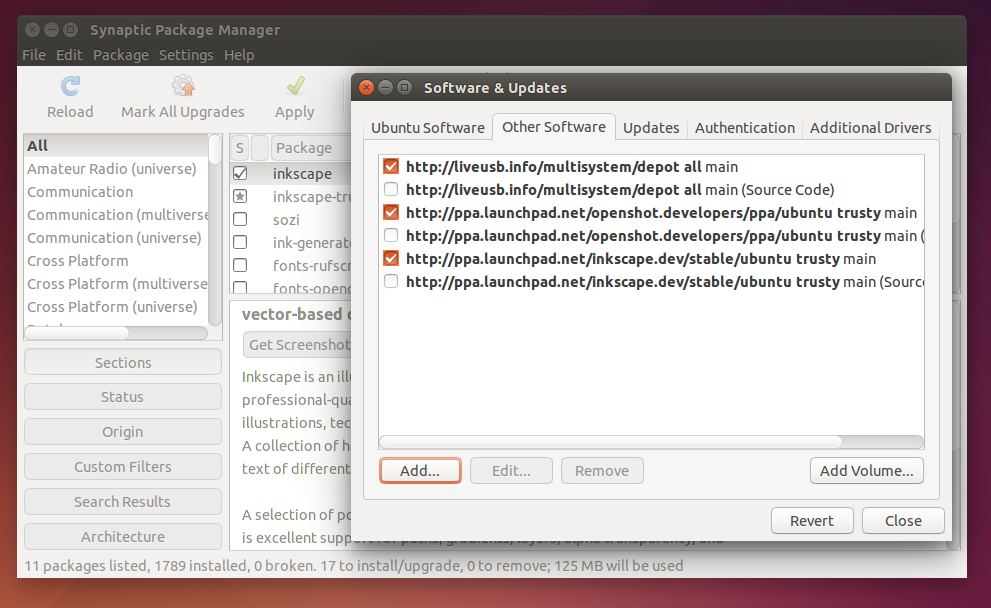
Installing and removing a PPA in Ubuntu is easy with GUI. If you usually install and remove a PPA via Terminal, then actually you can do it easier with Synaptic Package Manager. That is why we recommend Synaptic to you before. This article will show you how to do PPA installation in Ubuntu with Synaptic including the explanations.

Synaptic Managing PPA

One of many good things in Ubuntu is there are a lot of free and open source which can be installed easily from repository. The official Ubuntu repository contains applications which predefined release schedule, so there might be some delay publishing an application update from its author to Ubuntu users. GetDeb and PlayDeb repository is an unofficial project which aims to provide the latest version of free open source software for Ubuntu. New software will be available as soon as released by the author. The main difference between GetDeb and PlayDeb is GetDeb offers the common software for Ubuntu while PlayDeb focused on publishing game for Ubuntu with easy install.