Showing posts with label utility. Show all posts

Calculator is the default calculator application of Ubuntu. This program, originated from The GNOME Project, has simple interface, provides basic calculation ability useful in daily life as well as advanced and programming calculation abilities including financial ones. This is a mandatory utility to a general-purpose operating system like Ubuntu that serves humanity (as the name Ubuntu itself means humanity for others).


Subscribe to UbuntuBuzz Telegram Channel to get article updates.

Baobab (also called Disk Usage Analyzer) is a utility program default to Ubuntu that serves the purpose of disk usage analyzer that is showing ranking of directories in the filesystem based on used capacity in megabytes. With Baobab, you know which folder takes up how much space in comparison to other folders in a complete list. Further, this is very useful for example if you plan to remove some unused folders to free disk space but don't know which folders are safe to remove. And to Ubuntu users, Baobab fills the same purposes as KDE Filelight to Kubuntu users as well as WinDirStat (GNU GPL) to Windows users. Now let's start reading!


Subscribe to UbuntuBuzz Telegram Channel to get article updates.

Backups (also known as Deja Dup) is the default Ubuntu backup utility. It helps you handle scheduling backups and restoring in easy ways on your Ubuntu computers. It is simple by look but rich by feature as it includes ability to save your backups into both network storages as well as online storages such as Nextcloud, Google Drive or OneDrive. To Ubuntu user, Backups fills the purpose of KBackup to Kubuntu users and Windows Backup to Microsoft users. This article is part of our published compilation List of Ubuntu Default Applications and Their Purposes. We hope this helps everyone including you Ubuntu beginners. Now let's start sharing Free Software together once again!

Subscribe to UbuntuBuzz Telegram Channel to get article updates.

This is a simple guide to check your Ubuntu disk usage using built-in program named  Disk Usage Analyzer. With this, you can view ranking of folders measured by each size. This may help you finding and removing unused folders to free you some disk space. Let's try it!

Subscribe to UbuntuBuzz Telegram Channel to get article updates.

KIM (KDE Image Menu) is a third party plugin for KDE to add context menu (the right-click) able to do convert and resize to image file. KIM is very useful because it adds those convert and resize options into the right-click in Dolphin when you browse image files. It can do those manipulations to both every single image and many images simultaneously. Just click and done. This article introduce how to install KIM in KDE 5 because it needs special treatment compared to KDE 4. KIM is free software and licensed as GNU GPL 2.

Do you want CPU-Z in Linux? Then see I-Nex now. I-Nex is system utility tool for Linux. It shows you all your hardware plus you operating system and kernel detailed information. I-Nex is created for Linux with Gambas 3 platform. It is licensed in GNU LGPL version 3. I-Nex is a software by Michal Glowienka. If you want to contribute, visit I-Nex on https://github.com/eloaders/I-Nex. If you want to translate I-Nex, visit https://translations.launchpad.net/i-nex.

I-Nex Features

Laptop overheating is not a new issue. Specially after Ubuntu 11 series, the number of complaints against overheating and battery drainage has increased exponentially.

One superb and simple way to deal this issue is to use Jupiter. Jupiter is a light weight power and hardware control applet for Linux.  It is designed to improve battery life of a portable Linux computer by integrating with the operating system and changing parameters of the computer based on battery or powered connection.

It helps in controlling the heating to a certain extent and thus it also helps in improving battery life.

Mounty is small application which can mount popular disk images such as iso, img, bin, mdf, nrg directly from Application Indicator. Windows users who is familiar with Daemon Tools should know what Mounty is. There is another feature of Mounty, that's capability to burn disk images to CD/DVD.


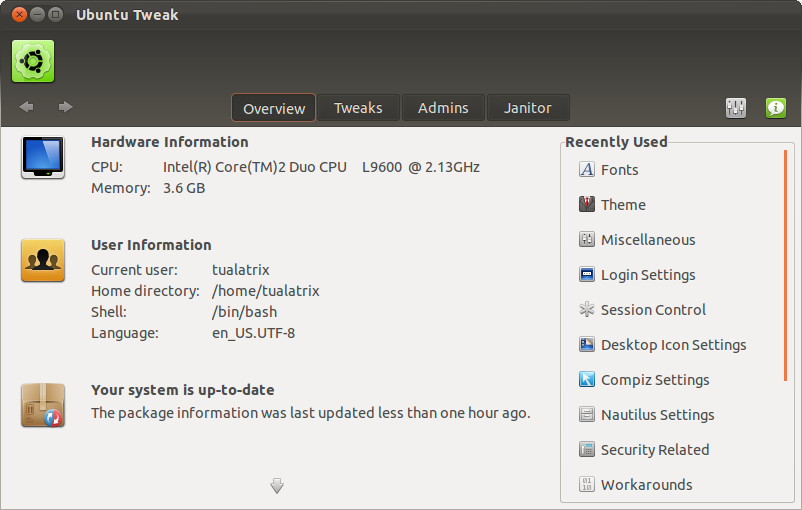
Ubuntu Tweak 0.6 (Stable) has been released with a brand new interface and features. It comes with many old features too, but the application and source center is removed because they cause many problems to the system. Here’s the noteworthy highlights of Ubuntu Tweak 0.6.0:

  • Brand new UI and interaction focus on better looking and easy to use
  • Supports the latest Ubuntu 11.10 Oneiric Ocelot and well integrated with system
  • Every part of Ubuntu Tweak is plug-able, this make Ubuntu Tweak more powerful then ever before
  • Janitor keeps your system clean
  • Overview makes you know your system better