Showing posts with label chinese. Show all posts

This tutorial will help you configure Ubuntu computer so you can write Chinese input () using keyboard. This is not to be confused with switching desktop language to Chinese as it has been documented in another tutorial. In this tutorial, we will use IBus technology and Noto CJK font provided built-in on Ubuntu. Lastly, we use Ubuntu 20.04 Focal Fossa for this tutorial. Let's start!


Subscribe to UbuntuBuzz Telegram Channel to get article updates.

This tutorial will help you switching Ubuntu user interface language to Chinese (汉语, Hànyǔ or 中文, Zhōngwén). We offer you both choices of Simplified (简化字, Jiǎnhuàzì) and Traditional Chinese (正體字, Zhèngtǐzì). This will change the language of basically everything you see on the screen including login screens, menus and buttons, calendar and locale / regional format. For example, once switched you will immediately see Files, Writer and Clock all turned into Chinese characters. We also included a procedure to revert back to English language in case you need it. Finally, we write this as an aid for our friends Ubuntu computer users whose language is Chinese everywhere including China, Hong Kong, Indonesia, Macau and Taiwan.
 
 
 (Ubuntu 20.04 with Simplified Chinese user interface)
Subscribe to UbuntuBuzz Telegram Channel to get article updates.
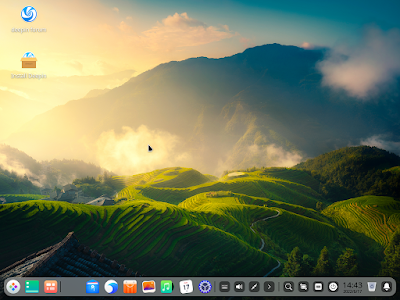
Deepin 20.6 released this June. This is the latest release of the Chinese-origin computer operating system that is beautiful, unique, easy to use, as well as Free Libre and Open Source Software. In this page you can download it with alternative links and checksums added for complete experience. 

Subscribe to UbuntuBuzz Telegram Channel to get article updates.