Showing posts with label DeepIn. Show all posts

Congratulations to Deepin Developers for the official release of Deepin OS 23! Deepin is a beautiful, artful, general purpose, free/libre open source software desktop operating system based on Debian GNU/Linux developed by Wuhan Technology Group from China. It has been released Sunday 15 August 2024 along with full download links. It is ready to empower your PC and laptop as an ethical replacement to Windows and MacOS. As a tradition at The Ubuntu Buzz, we present you this listing of them and encourage you to download Deepin together with beneficial mirrors, torrents, links to guides of verifying the ISO, making the bootable and install it to your machine. Let's go!


Subscribe to UbuntuBuzz Telegram Channel to get article updates.

This article presents a compilation of ten distinctive features of deepin OS served as a gentle introduction for computer and laptop users. It is a stylish, modern, innovative, well-designed, simple and easy to use yet powerful and configurable system everybody can love. If you want to know deepin in brief, then this article is really for you. Please read on!


Subscribe to UbuntuBuzz Telegram Channel to get article updates.

This is an overview of deepin OS for everyone who looks for the best alternative operating systems for their computing. It is a GNU/Linux distribution that is well made, artistic and beautiful, practically easy to use, and at the same time unique no other Free Software Desktop Systems could ever thought to be. We made this review based on version 20.2.4 and hopefully this can give you pictures of deepin OS. Lastly, we still hope that deepin OS will soon be mass produced so people can just purchase a deepin laptop or deepin PC they want to start their software freedom.

Subscribe to UbuntuBuzz Telegram Channel to get article updates.

This tutorial explains how user can search for files and folders on a deepin OS computer. deepin OS, formerly Hiweed, is a Chinese computer operating system first launched in 2004 and comes with its own user interface that is beautifully unique called DDE. This involves File Manager, the file manager of deepin OS, and in this article we use the OS version 20 and the program version 5.2. Let's start.

Subscribe to UbuntuBuzz Telegram Channel to get article updates.

Hello, convenience lovers! We are all using GNU/Linux technologies. Ever dissatisfied when doing open/save in your application? Perhaps you want it to show you thumbnails preview but not, allows modes other than list view but not, provide search but not, display recent files but not, or you expect it puts all storage disks right at the front but not. I will help you choose a technology you can see below between KDE, GNOME, Elementary OS, Deepin, and LXDE so you can decide which distro you will use or even share with family later.
 
(File dialog from Deepin is the best file dialog in all GNU/Linux techs today)
Subscribe to UbuntuBuzz Telegram Channel to get article updates.

Curious about Deepin 20? Here's our review to this latest version of the super beautiful and unique China operating system for your computers and laptops. We can say that Deepin is now a fashion in computing ready to compete with Windows and MacOS. This series of release begins with the big switch, from WPS to LibreOffice, and similarly from Google Chrome to Browser, aside from other large improvements in its system most notably the desktop in general and Control Center in particular. Here's Deepin Twenty for you all!


Continuing similar issue fixing for KDE, it is now apparent that LibreOffice looks also "ugly" on Deepin 20 and later. This means its visual appears ancient unlike what users expect and look unmatched with the Deepin desktop themes. To solve this issue, follow these instructions.


Subscribe to UbuntuBuzz Telegram Channel to get article updates.

This tutorial explains how you can enable your Deepin GNU/Linux version 20 upwards on your computer (codenamed Apricot) to install more software. This done by setting up the repository (central of software on the internet) so the user has the correct configuration. The result is you can later search, download, and run software you wish on your Deepin computer. You are required to be able to edit text in administrator mode to practice this. For experienced persons, you may want to go to Sources.list section right away.

Subscribe to UbuntuBuzz Telegram Channel to get article updates.

Making bootable drive is an important thing to all computer users. Previously my articles about it using the tools GNOME Disk Utility, GNU dd, MultiSystem, and GLIM, reached incredible success indicating that many people need it. Now as deepin GNU/Linux 20 released with new technology especially the tool Boot Maker, and it is wondefully easy to use, computer users can use that to make bootable flash drive of any operating system images. This tutorial explains in step by step on using it. Let's go!

(This is you new tool to create bootable usb)
Subscribe to UbuntuBuzz Telegram Channel to get article updates.


In December 2019, at the same time I shipped another multiboot GNU/Linux to different customer in Sulawesi Island, Indonesia. For this, my customer ordered deepin 15, but GLIM Maker cannot make it multiboot. To my experience, deepin ISO images work best if they made singleboot in a flash drive (similar to BlankOn's). So I edited the configuration code mimicking a singleboot's config and it worked. You can use my scripts below to make your own multiboot with depin as one among its OSes. Happy hacking!

Subscribe to UbuntuBuzz Telegram Channel to get article updates directly.

(Aguslr's Multiboot USB: the best GNU/Linux multiboot maker so far for me)

Just like previously I stated, after MultiSystem, Sundar's MultiBootUSB, and Thias' GLIM, finally I found Aguslr's Multiboot USB tool to create perfect multiboot OS pendrive that supports great number of GNU/Linux distros including openSUSE, CentOS, and Deepin. More than that, it also supports Android-x86 and even BSD family. Awesome, right? However, the setup of this tool is honestly difficult especially for us who are not familiar with command lines. But I present you here faster and easier setup with screenshots and example. Enjoy!

Subscribe to UbuntuBuzz Telegram Channel to get article updates directly.

I tried to make this article to help everybody find a desktop choice among Deepin, Mint, and Elementary operating systems. I select them because they are solely focused on desktop and have developed their own user interface. They are all GNU/Linux systems from Debian family, but with several distinctions you may love to see. For example, they differ on their own file managers, user interface layouts and built-in apps and several more things.
(Deepin 15.10, Mint 19, and Elementary 5.0 showing their desktops with start menu opened)

You will also find which one still supports 32-bit PC nowadays, which one supports Flatpak by default, and more. Finally, I wish you can empower your PC and laptop with one of them. Enjoy!

Subscribe to UbuntuBuzz Telegram Channel to get article updates directly.

(Successful deepin 15.10 installation result)

This tutorial explains procedures to install deepin 15.10 to external storage such as USB Flash Drive or Hard Disk. This way, deepin can run everywhere you go. You will prepare at least 32GB USB drive, create two partitions, and then install deepin into the larger one. Regarding filesystem type, I highly recommend using EXT2 for flash drive and EXT4 for hard disk (or SSD). Finally, you can also practice this tutorial to deepin 15.11. Enjoy your installation!

Subscribe to UbuntuBuzz Telegram Channel to get article updates directly.

deepin 15.11 released this July with the slogan "Better Never Stops" just three months after the previous 15.10 last April. Here's official direct download links from official server, SourceForge, OSDN, and also several mirrors, and of course torrents provided by community. Just like usual, I strongly recommend you to use BitTorrent way instead and then verify your ISO to be identical with the official one. Finally, so you can safely burn that ISO to DVD or USB and run deepin GNU/Linux. Happy downloading!

Subscribe to UbuntuBuzz Telegram Channel to get article updates directly.

 
(deepin 15.10 with new feature Auto Merge on desktop)

For users who want to know latest deepin 15.10 before downloading it, this article is for you. In this version, deepin once again fulfills its commitment to be pretty and user friendly, as it brings a lot of new improvements in shapes and performance. Nw it introduces Auto Merge on desktop, along with new control for Sound Effects. The file manager got Advanced Search. It even got a new window manager, called dde-kwin, modified from KDE Kwin. And now it is rebased to Debian Stable instead of Unstable, for the users to get more timely security updates. I hope this short overview gives you enough information to finally try deepin 15.10. Enjoy!

Subscribe to UbuntuBuzz Telegram Channel to get article updates directly.

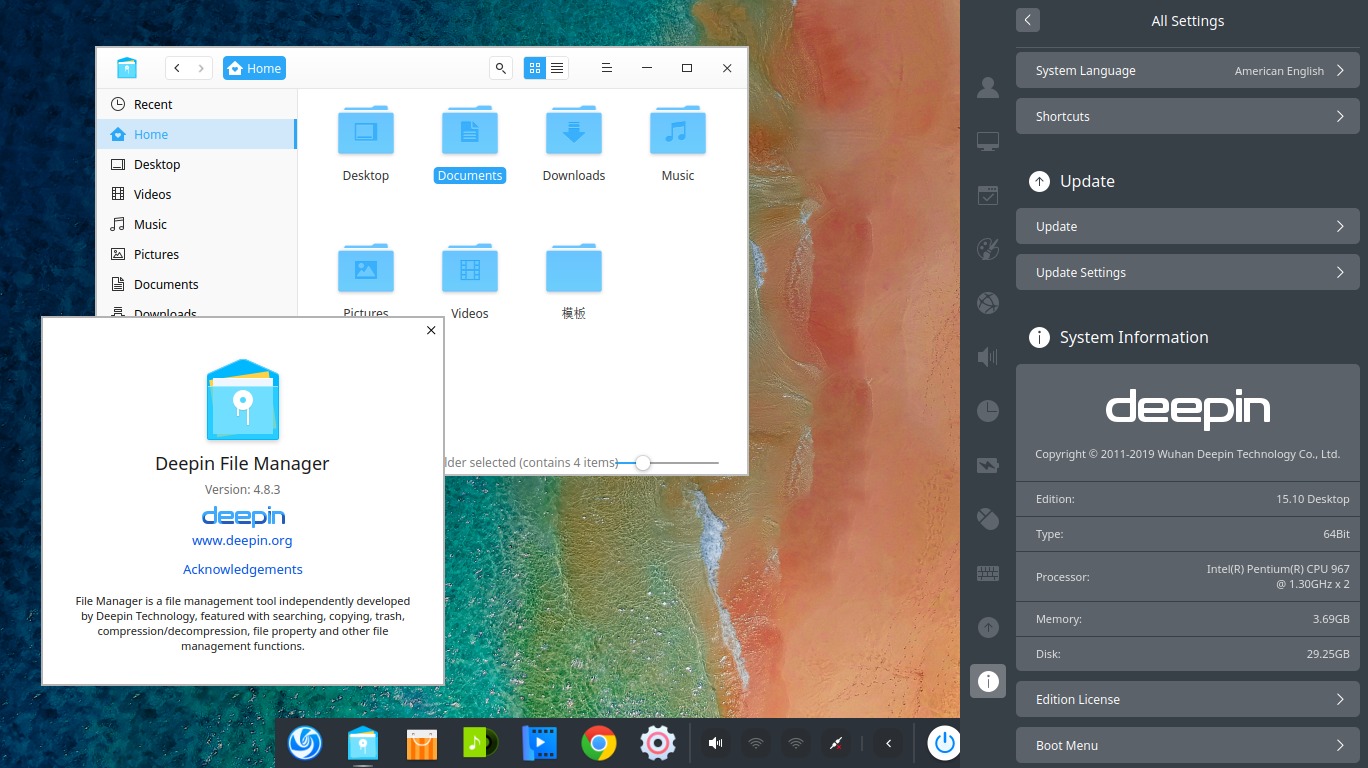
(deepin 15.10 desktop running from a LiveCD session with its System Info opened on right panel)

deepin 15.10, the gorgeous Debian-based desktop operating system, has been released at Sunday, 28 April 2019. The ISO image size is now 2.3GiB. As usual, I listed here official download link with several countries' mirrors, torrents from several sources, and the checksums. However, the release number is identical to Ubuntu 15.10 "Wily Werewolf" but don't worry, they are separate things. Happy downloading!

Subscribe to UbuntuBuzz Telegram Channel to get article updates directly.


Both deepin 15.6 and 15.7 were released at June and August 2018. Here's a short summary of them showing the new features and improvements. You will find new Welcome Intro, new Dark Theme, new Power Saving Mode, reduced RAM usage and smaller ISO size, improvements in System Settings, and new ability of File Manager (renaming partition by right-click, for example). You will see them in this article with GIF animations and screenshots. This article also shows in brief why 15.7 is far better than 15.6 so you can choose it to start deepin for your first time. Enjoy!

Subscribe to UbuntuBuzz Telegram Channel to get article updates directly.


deepin 15.7 GNU/Linux operating system has been released on Monday, 20 August 2018. It's not so long after the previous 15.6 at June 2018. This updated version uncommonly brings lesser ISO size (now 2.3GB, previously 3.1GB) other than its RAM/CPU usage enhancements. So here's the list of download links plus torrents. Happy downloading!

Subscribe to UbuntuBuzz Telegram Channel to get article updates directly.

Linux Deepin is an Ubuntu based distribution which aims to be fast, elegant, beautiful, and easy to use. It has polished look and feel which makes us happy to use it. Linux Deepin is available as standaalone distribution so you can install it as a new system. Otherwise, if you don't want to remove the current installation of Ubuntu, you can install its Desktop Manager to gain some experiences using Linux Deepin desktop. Please don't install Linux Deepin Desktop on your production system because it may broke your system.

Deepin Software Center as known as DSC is a killer application of Linux Deepin. It's just like Ubuntu Software Center with some additions such as parallel downloading, resuming download, update notification, cache cleaning, and colorful skins that can be swapped as your mood changes.