


Canonical desktop engineer Didier Roche has clarified Ubuntu's upcoming AI-capable desktop launcher on Ubuntu Discourse, revealing live working code behind October's warty-prototype mockup and scheduling a first testable release for January. Unlike forced cloud assistants on proprietary desktops, Ubuntu's unified entry point keeps AI strictly optional, local-first, and sandboxed through Snap confinement. Ubuntu users can inspect the prototype package, test the companion Myna offline dictation stack, and prepare local hardware ahead of January.

From October Simulation to Working Desktop Code
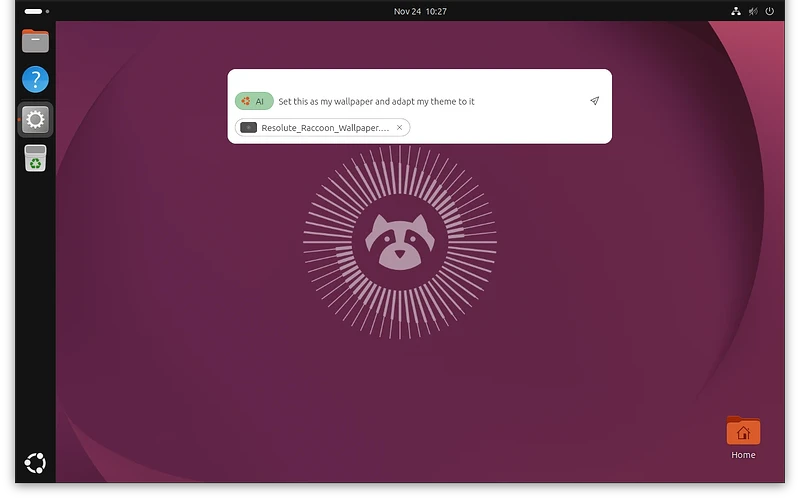
When Canonical published warty-prototype (version 0.1.0) to the Snap Store's edge channel in October 2026, the package triggered both curiosity and skepticism across Linux communities. Triggering its sample prompts—such as adapting desktop themes to a wallpaper or turning clipboard notes into a calendar plan—only displayed desktop notifications describing hypothetical outcomes rather than altering system state. In a detailed November 24 Ubuntu Discourse engineering update, cross-referenced from an initial French report by Clubic Linux, Roche confirmed that the snap was purely an automated UI simulation built to spark design debate.
More importantly, Canonical paired that clarification with a screenshot of active, working launcher code rather than static mockups. The goal is not to scatter disconnected assistant widgets across GNOME Shell, nor to replace classic keyboard workflows with a sluggish web view. Instead, the Ubuntu Desktop team is building a single, fast entry point for launching applications, locating local files, and invoking contextual assistance only when explicitly requested by the user.
Four Non-Negotiable Principles Guiding the Architecture
To avoid bloating the operating system or compromising desktop responsiveness, Canonical framed the launcher around the same incremental engineering discipline used in oxidising Ubuntu core utilities with Rust (sudo-rs and rust-coreutils), landing GNOME dynamic triple buffering, and deploying TPM-backed Full Disk Encryption. Core fundamentals—instant startup, low memory overhead, and clean desktop integration—come first, governed by four explicit guardrails:
1. Strictly Opt-In AI Capabilities
Users who want a fast, traditional application and file launcher get that behavior as a first-class experience out of the box. AI modules remain strictly opt-in, and Canonical explicitly confirmed that default Ubuntu installations will not ship gigabytes of bundled language model weights.
2. Local-First Inference Execution
When users choose to enable intelligent features, workloads target local models running directly on CPU, GPU, or NPU hardware rather than forwarding desktop queries to external cloud endpoints by default.
3. Privacy Through On-Disk Locality
Because indexing and inference occur on the local machine, personal documents, clipboard context, and daily application habits remain on user-controlled storage.
4. Security via Snap Confinement
Experimental or agentic components run inside Ubuntu's strict Snap sandboxing and AppArmor confinement boundaries. Isolating inference workers prevents untrusted prompts or plugin behaviors from accessing arbitrary host files.
Architectural Comparison: Mockup vs. January Build vs. GNOME Overview
Understanding how the October prototype differs from January's upcoming release—and from Ubuntu's current GNOME Shell overview—clarifies what testers should expect early next year:
| Dimension | warty-prototype (Oct 2026) | January 2027 Test Release | Default GNOME App Grid |
|---|---|---|---|
| Implementation Status | Automated UI simulation (0.1.0) |
Functional core launcher codebase | Production GNOME Shell component |
| AI Execution | Mock notifications only | Optional, local-first foundations | None (static search providers) |
| Input Modalities | Keyboard mockup workflows | Keyboard + local voice hooks | Keyboard & pointer |
| Default ISO Impact | Separate edge snap |
Zero forced model bloat | Built into Ubuntu Desktop |
| Security Boundary | Snap package isolation | Strictly confined Snap sandboxing | Host desktop session scope |
Voice Input Blueprint: How Canonical's Myna Stack Fits In
Roche specifically highlighted speech-friendly interaction alongside keyboard navigation, tying the launcher's vision directly to Canonical's Myna project on GitHub and its recent Ubuntu Blog speech-to-text technology preview. Examining Myna's open-source repository reveals the exact security pattern Canonical favors for local desktop AI.
Rather than granting a heavyweight Python runtime direct access to your hardware, Myna splits its architecture across a strict trust boundary. A lightweight Rust client (myna-desktop) captures microphone audio, manages global hotkeys, and injects transcribed text into focused Wayland or X11 windows through IBus. Meanwhile, the Python inference server—supporting Whisper, Parakeet, and FunASR adapters—runs inside strictly confined snaps and receives PCM audio strictly over a local Unix domain socket, ensuring inference backends never touch the microphone device directly.
Hands-On: Inspect the Prototype and Test Myna on Ubuntu
While the functional launcher build arrives in January, Ubuntu 24.04 LTS and 26.04 users can already inspect the warty-prototype Snap Store listing and deploy Myna's local voice stack to evaluate Canonical's confinement model firsthand.
Step 1: Inspect the UI Prototype Metadata Safely
Check the exact channel, publisher, and revision details of warty-prototype before installing anything, or run the edge simulation briefly and clean it up afterward:
# Inspect the design prototype metadata without installing
snap info warty-prototype

# Optional: install the non-destructive edge UI simulation, then remove it
sudo snap install warty-prototype --edge
warty-prototype
sudo snap remove --purge warty-prototype
Step 2: Install Myna and Verify Hardware Readiness
To try Canonical's offline speech-to-text stack on Ubuntu Desktop 24.04 or newer (including Kubuntu 26.04 on Plasma 6 Wayland or Xubuntu 24.04), install myna-config from the official desktop team PPA and inspect your local compute headroom:
# Add Canonical Desktop Team's Myna PPA and install the configuration GUI
sudo add-apt-repository ppa:canonical-desktop-team/myna
sudo apt update
sudo apt install myna-config

# Verify CPU instruction sets, available RAM, and GPU/Vulkan support for local AI
lscpu | grep -E "Model name|avx2|avx512"
free -h
vulkaninfo --summary 2>/dev/null | head -n 20 || nvidia-smiint8 or base-sized local speech models inside myna-config and monitor background RAM usage via snap connections and htop before adding larger desktop models in January.Preparing for the January Community Release
Canonical is modeling this rollout on earlier community-driven milestones such as the Yaru default theme initiative, asking desktop users to test early builds, challenge UX assumptions, and flag performance regressions before anything reaches an LTS release. When the January build ships alongside its full architectural documentation, developers and everyday Ubuntu users can share workflow feedback directly in the Ubuntu Discourse AI working thread to shape how local intelligence integrates with the Linux desktop.