Showing posts with label jitsi. Show all posts

This list collects twenty popular free software applications and libraries released under Apache License. This is a continuation to our previous list with GNU GPL that unexpectedly became very popular. We hope this helps everybody who studies free/libre open source software to know deeper. Let's read on!


Subscribe to UbuntuBuzz Telegram Channel to get article updates.

This is a list of FOSS instant messenger applications. It's aimed for people who want to quickly use and know more about Telegram, Signal and many others as free/libre open source software alternatives to Skype or WhatsApp proprietary messengers. We hope this helps you and your friends choose one. Happy communicating!
 

Subscribe to UbuntuBuzz Telegram Channel to get article updates.

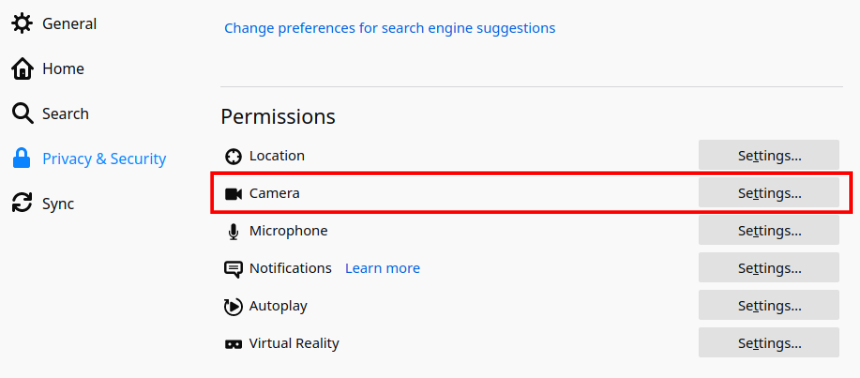
To disable camera permanently on Firefox, open the menu button > Preferences > go to Privacy & Security settings > Permissions section > find Camera > click Settings > check Block new requests asking to access your camera > Save Changes > finished. Now every website requiring camera will automatically be blocked to access the camera. For example, it is useful if you often do screen sharing via video conferences but had been disabling manually every camera access so with this trick now you will have it disabled automatically in every conference while all other features like microphone (voice) and text (chat) still work normally. Another important benefit is that now you can disable your camera without putting a sticker to cover it physically. Happy conferencing! 


Camera privacy settings:

Disabling camera and save the changes:

To enable camera again, simply go to the same settings and uncheck Block new requests asking to access your camera and Save Changes.

This has been practiced on Firefox version 81 with Jitsi Meet.


This article is licensed under CC BY-SA 3.0.

You can video call without phone, number, nor email. Here, if you can video call, of course you can do group chat, voice, upload files, and share screen too. Thanks to Element and several other choices, now this is possible. It is very useful for everybody in teams or groups today especially when work from home becomes a norm. What to prepare and how to do it? This article explains it briefly special for you and your friends.

Subscribe to UbuntuBuzz Telegram Channel to get article updates.

What is your choice after switching from Zoom? You should choose Free Libre Open Source Software solutions like mentioned in this article. This list offers you choices of video call platform which are accessible using both computer & phone, free at no cost access, and also do not require you to install app. I wish this list helps every student, teacher, school, and university in the world. Please help me share! 

Subscribe to UbuntuBuzz Telegram Channel to get article updates.

I teach GNU/Linux. I make a computer school online for Indonesian people by using Free Software and GNU operating systems for living purposes. Among the skills students learn are writing documents with LibreOffice and mastering Ubuntu. I have used Jitsi video call technology for about six month since early 2020 and I found it perfect for my online teaching as I open classes in my country Indonesia for people from Sumatra to Papua islands. Of course I also use Telegram as it is the easiest FLOSS communication tool for me and my students. I am happy to share with you my teaching experiences.

Subscribe to UbuntuBuzz Telegram Channel to get article updates directly.

Let me share with you my Ubuntu tips for teaching and studying you could practice easily at school. Of course these tips are based more on free/libre open source software principles so you will see alternatives like PeerTube among mentioned tools. However, all software mentioned below are Free Software exclusively and available in 20.04 Focal Fossa. I hope websites other than UbuntuBuzz follow by exposing Ubuntu education capability like this. Happy studying!


(A six minute video featuring education tools on Focal - among them LibreOffice and Kazam | this video is downloadable, hosted at peertube)
Subscribe to UbuntuBuzz Telegram Channel to get article updates directly.

Librehost or Libreho.st is a group of libre hosters. They are Google-like free online service providers but unlike Google they are committed to Free Software and User's Privacy. They provide many internet services alternative to Gafam for free and without ads. Some of them offer paid server hostings too but with commitment to use GNU/Linux inside. You can sign up at Librehost to get free services --for example-- alternative to Gmail, Twitter, WhatsApp, and Zoom. Characteristics of Librehost are they love decentralization; enable everybody to join open standard communication and gather within Fediverse. For us who seek Gafam alternatives after 2013 Global Surveillance, we now find Librehost. This article tries to introduce Librehost to public by showing several services freely available from them everybody could instantly try. Enjoy!

(Main page of Librehost website showing list of free & ethical service providers)

Subscribe to UbuntuBuzz Telegram Channel to get article updates directly.

This is a list of good alternatives to GAFAM online services in ways understandable by people without deep knowledge about computer. By "Gafam" I mean popular online services of Google, Facebook, and alike and by "Alternative World" I mean Free Software-based challenging services of SearX, Mastodon, PeerTube, and alike. You can find here the new term Fediverse is sided with Alternative World. I hope this short article helps everybody to try out our Alternative World. Enjoy!

Subscribe to UbuntuBuzz Telegram Channel to get article updates directly.

This list presents generous free online providers who give multiple services that enables everyone chatting, video & voice conferencing, screen sharing, file sharing, collaborative document editing, and many more. The technology they give are mostly Jitsi, BigBlueButton, Mumble, Etherpad, and Jabber, with more additional ones. By "free" here I mean both ways that the services price are gratis and the software inside are also free as in freedom. I hope this list helps everybody worldwide to stay at home in the pandemic of COVID-19. Be safe and healthy!


Subscribe to UbuntuBuzz Telegram Channel to get article updates directly.

This tutorial explains you to communicate with people using Jitsi Video Conference via the internet. I hope this short guide helps everyone in this time of worldwide COVID-19 pandemic.


Requirements

  • 1) Web browser
  • 2) Enough internet access
  • 3) Earphone with microphone capability

Jitsi Advantages

  • Gratis
  • Instant (browser based), does not need additional application
  • Universal, any device any operating system can use
  • Video conference
  • Voice conference
  • Multiple participants
  • Text chat
  • Share screen in both ways
  • Easy invite other person(s)
  • Room administration (room password, first user is admin, kick, mute/unmute to participants)

To dear readers, in the emergency of COVID-19 widespread disease, we all needed to keep staying at home but in fact we still need to communicate with people. For that purpose, I listed here several free & popular communication tools everybody can use on Ubuntu with short guidances in using them. They are email & mailing list, IRC webchat, Telegram, and Jitsi Meet. They are all gratis and quick to use and I myself using them for online teaching and reaching people out there. Stay safe and be healthy!

 
(Back to basic with email group to communicate online)

Subscribe to UbuntuBuzz Telegram Channel to get article updates directly.


Jitsi Meet is an awesome free software technology for video conferencing. Personally, I am currently testing Jitsi for my online class with my students in Indonesia. You can use Jitsi for either voice or video call with multiple participants online. The great news is that Jitsi Project provides a gratis chatroom at meet.jit.si for everybody so we can create conference room instantly and go talking without setting up any server first. This tutorial explains how to install Jitsi Meet desktop client on Ubuntu & Trisquel, and then quickly create a Jitsi server with that service, and go conferencing.

Subscribe to UbuntuBuzz Telegram Channel to get article updates directly.