

Vuze is cross-platform BitTorrent Client which rich of features, you can find any Video easily and play it in High Definition (HD) Format.
What is Vuse ?
Vuze originally known as Azureus is a cross-platform BitTorrent client written in Java, Vuze is application with rich of features. Through Vuse we can search and download torrent with powerful HD content and video, music and games, and convert all video format to playable format that recognize by your device (PC, Mac, iPhone, iPod, Apple TV, Xbox 360 and PS3).
What Vuse can do ? (Vuse Features)
Vuse is All in One BitTorrent application, you can find, mark out, convert, and download high quality video to your device, some things that you can do using Vuse are :
Showing posts with label internet tool. Show all posts
Showing posts with label internet tool. Show all posts
Spotify - A new world of free music is just a click away, Discover and share it all with your friends.
Spotify is peer-to-peer music streaming service that gives registered user access to millions of songs from major and independent record labels such us Sony, EMI, Warner Music Group, and Universal which free to listen. Spotify is support Microsoft Windows, Mac OS X, iOS (iPod/iPhone), Android, BlackBerry and now it comes to Linux.

Opera 11.60 has released today, the latest version of its Internet browser Opera 11.60, “just in time for the festive season”, according to a company announcement today.
Opera 11.60 code name "Tunny" has been relaese, Opera 11.60 comes with new features, design, also bugs fix, read the full Opera 11.60 changelog here.
 |
| Opera 11.60 "Tunny" Screenshot |
Hello everyone! Good to see you again. Today I'd like to write a tutorial on how to install Google Earth on Ubuntu 11.10 Oneiric Ocelot. Google Earth is one of Google products acts as a virtual globe, map and geographical information program that lets you fly anywhere on Earth to view satellite imagery, maps, terrain, 3D buildings, from galaxies in outer space to the canyons of the ocean. It's a great application and fortunately you can run it natively on Ubuntu including the latest Ubuntu 11.10 Oneiric Ocelot.

Google has launched Google+ pages, now you can create a Google+ Pages for your community, website, brand, product, and Organization. Here step by step to create Google+ pages for your Community
Login to Google+
Before start creating Google+ pages, you must be registered in Google+. Start creating Google+ pages by log in to your Google+ Account.
 |
| Google+ login pages |
Is Google+ logo changed ?
Today, when i was check in Google+, I see something different from before, the Google+ favicon has been changed, is this new Google+ logo, was you notice at this changes ?
 | ||
| Google+ new Logo ? |
Eventually Firefox 8 Final has release and available for download, even though it's still not available in Mozilla Firefox Official page, you can download Firefox 8 through Mozilla Firefox FTP (official FTP page that maintain by Mozilla team). What new features inside Firefox 8 and what changes has happened since its last release ?, here some notable change regarding to Firefox 8 features release page, and Key Points of the Study taken from techdrivein.com :
Firefox 8 Notable Changes
- Add People Search to Firefox (Twitter)
- Silent Update: Lessen the showing of the what's new page
- Expose prefs for tabs-on-demand
- Ensure user accepts add-ons installed by third-party apps
- Confirm add-ons on upgrade
Mozilla Thunderbird has replace an Evolution presence in Ubuntu (Since Ubuntu 11.04), there is nothing wrong with this replacement, this is only a policy of canonical to make a good movement for Ubuntu in the future (just like switching from Gnome Desktop to Unity).
 |
| Thunderbird 7.0.1 a default mail application in Ubuntu 11.10 |
Turpial is Open Source twitter client application writes with python, though my opinion turpial is the best twitter client application ever which run in Ubuntu compared with Choqok, qtwit even gwibber. Turpial have good a appearance (some point having good icons), performance (you have a lot of setting inside), and User Friendly GUI that make us quickly to understand some function that available.
Gwibber 3.4 plans to integrate with Google+ in ones of their services, this notes taken from Ken VanDine blog (creator of Gwibber).
Gwibber 3.4 will available in Ubuntu 12.04 Precise Pangolin but we strongly hope that we can taste it in Ubuntu 11.10, with the new Gwibber client, there aren’t really many new “features” however it is important to note not all previous features made it in (Ken van dine says). Some working on progress that we can see in Gwibber 3.4 launchpad are :
- Add Google+ Service to Gwibber, Gwibber "Smooth scrolling",
- CPU usage shoots up when opening new tweet box,
- Ability to post images & attachments to identi.ca & status.net, and
- Facebook send messages, user profiles, comments, and likes.
After Ubuntu 11.10 released now its turn of Mozilla Firefox to release thier product, yesterday Firefox development team release Firefox 10 Alpha 1 (nightly) and ready to download via FTP or install via PPA.

Download Firefox 10 Alpha 1
Firefox 10 Alpha 1 (nightly) ready to download via Mozilla Firefox team official 'daily build' page. You can download Firefox 10 alpha 1 in various platform, download Firefox 10 Alpha 1 through following link :

- Native 64-bit Support (Flash Player desktop) — Take advantage of native support for 64-bit operating systems and 64-bit web browsers on Linux, Mac OS, and Windows.
- Asynchronous Bitmap Decoding (new for Flash Player) — Improve app responsiveness and deliver smoother animation by decoding images on initial load instead of on demand. Images are cached as needed.
- TLS Secure Sockets Support (new for Flash Player) — Enables secure communications for client/server applications.
Finally Mozilla Firefox 7 released, Since Firefox 7 beta shipped with Ubuntu 11.10 Alpha 2, we guess (can be ensured) that Firefox 7 Final will released soon along with ubuntu 11.10 release in October 13th and will be shipped as default browser there.
Firefox 7 Final Features
Unlike in the previous release, on this release there are not many changes happen, in term of performance or appearance, here some features you can found at Firefox 7 Final :
- Simple options for add-ons embedded in the main UI, For detail of this feature you can read in here.
- Improve Responsiveness with Memory Reductions, For detail of this feature you can read in here.
Yesterday (6 Sept 2011), Adobe labs officially released Flash Player 11 Release Candidate (RC) through this page, some new features that available on Flash Player 11 are :
- Native 64-bit Support (Flash Player desktop) — Take advantage of native support for 64-bit operating systems and 64-bit web browsers on Linux, Mac OS, and Windows.
- Asynchronous Bitmap Decoding (new for Flash Player) — Improve app responsiveness and deliver smoother animation by decoding images on initial load instead of on demand. Images are cached as needed.
- TLS Secure Sockets Support (new for Flash Player) — Enables secure communications for client/server applications.
- Some other features you can find in here
Finally Mozilla Firefox team has Officially release Firefox 6 Final trough this announcement and has been putted in mozillateam PPA, for those ubuntu user who have not tried yet, can Install/Upgrade to Firefox 6 through this way.
 |
| Mozilla Firefox 6 Final |
Upgrade / Install Firefox 6 via PPA
Follow this step to upgrade/install Mozilla Firefox 6 Final to ubuntu :
Follow this step to upgrade/install Mozilla Firefox 6 Final to ubuntu :
- sudo add-apt-repository ppa:mozillateam/firefox-stable
- sudo apt-get update
- sudo apt-get dist-upgrade
Although Firefox 6 not yet release 'officialy' by Mozilla Firefox Team, Finaly Firefox 6 Final has been available in Mozilla Firefox FTP since 08/11/2011 and ready for download, you can test and install it in Linux / Ubuntu, download Firefox 6 through this link :
- Download Firefox 6 for Linux/Ubuntu 32bit (tar.bz2) : here
- Download Firefox 6 for Linux/Ubuntu 64bit (tar.bz2) : here
- Download Firefox 6 for Mac : here
- Download Firefox 6 for windows 32bit : here
For other version and operating system you can Mozilla Firefox official FTP page on following links :
A Google Music is part of Google Project which provide management (and storage) for personal music/video collection which can be easily accessed/syncronized through any device using internet connection. You can upload your personal music collection to listen anywhere, keep everything in sync, and forget the hassle of cables and files.
 |
| Google Music Screenshot |
Google Music still on Beta version, to start using this service, you must be invited (just like other google project application) and upload music/video to the Google Music then you can start to listen everywhere. To get your device sync to google music you must installed Google Music Manager in your device, now google music manager has available in many platform such Windows, Android, and ofcourse Linux (Ubuntu), click link below to install / Download Google Music Manager for Ubuntu.
Google has release (soft launching) their new application called Google+ (Plus), can Google+ steal facebookers ?
What is Google + ?
Google+ is social media network which integrated with all google application, just like Facebook, you can manage your social account such adding foto, sharing news, sending invitation, and more. till now Google+ is still not available to all internet user (public) but google has invite several people to try their new product by invitation, some rumors say google also invite Facebook management (including Mr. Mark zuckerberg).
 |
| Google+ Welcome Page |
"Can Google+ beat Facebook?", The real question may not be too precise. This is not about one site against another site because Google + is bigger than that. The reason why Google calls "Google Project +" is because Google + would become a central of Google's identity. It will reshape the company. So the more appropriate question is "Can Google beat Facebook?" If it is placed like that, the contest appears to be much more balanced.
Regarding to question above, here are some reason (opinion) why Google+ is better than Facebook.
Although it's already have discussed by other blog and website, we're interested to discuss how to setup Ubuntu One in Ubuntu 11.04 on this article, Please read our FAQ first if you're have trouble setting up Ubuntu One.
Before it's start, you should register, create account at http://one.ubuntu.com/account, or follow this step :
- Open the Ubuntu One control panel (upper right corner).
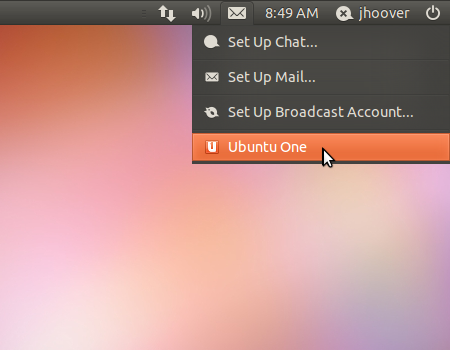 |
| Ubuntu One widget indicator |